Arduino Tutorial: KY-013 Analog Temperature Sensor
Abstract
Learn how to use the KY-013 Analog Temperature Sensor Module (which uses a Thermistor) with Arduino. This is the first deep dive into Analog Input, focusing on configuring an Analog Pin to read a variable voltage signal. This tutorial covers using the Analog-to-Digital Converter (ADC) via analogRead(), calculating resistance, and converting the raw value into a meaningful temperature reading in Celsius.
1. Introduction
Up until now, we’ve dealt with digital signals (HIGH/LOW). The KY-013 contains an NTC Thermistor (Negative Temperature Coefficient), a type of resistor whose resistance decreases significantly as its temperature increases. This variable resistance is converted into a variable voltage by placing it in a voltage divider circuit on the module.
In this episode, you’ll learn:
- The fundamentals of the Analog-to-Digital Converter (ADC).
- How to use the key function analogRead().
- The steps to convert a 0-1023 raw ADC value into a precise resistance
- How to apply the B-parameter equation to convert resistance into temperature (K and ∘C).
This project is essential for any application requiring continuous, quantitative monitoring of environmental conditions.
2. Prerequisites
Make sure you have:
- An Arduino Uno or compatible board.
- One KY-013 Analog Temperature Sensor Module.
- Jumper Wires.
- Arduino IDE
3. Wiring and Setup for Arduino
The KY-013 module typically has three pins and requires analog input.
Step 1 – Identify Pins
The module has three pins: Signal (S or OUT), VCC (+), and Ground (− or GND).
Step 2 – Connect the Module
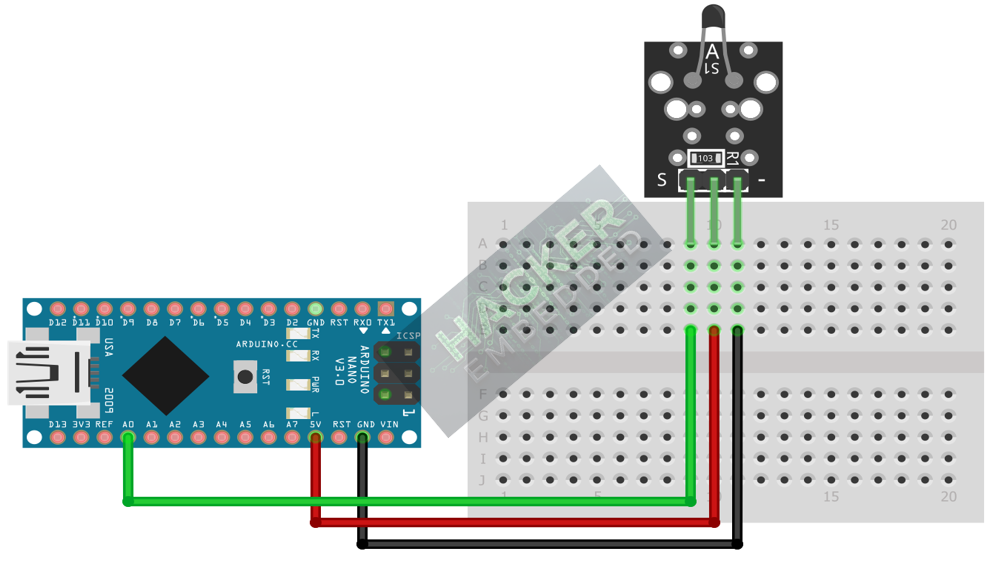
Wire the module to the Arduino as follows. The signal pin must be connected to one of the Analog Input Pins (A0-A5).
- Connect the – / GND pin of the KY-013 to the GND pin on the Arduino.
- Connect the + / VCC pin of the KY-013 to the 5V pin on the Arduino.
- Connect the S / Signal pin of the KY-013 to Arduino Analog Pin A0.
This image was created with Fritzing
Step 3 – Understanding analogRead()
The Arduino’s ADC converts the input voltage (which ranges from 0V to 5V) into a digital number between 0 and 1023 (a 10-bit resolution).
4. Writing Temperature Conversion Code
The KY-013 typically uses an NTC 10kΩ Thermistor in series with another fixed 10kΩ resistor (the voltage divider). We must use a formula based on these constants to get an accurate reading.
Open main.ino and implement the following code.
Code Explanation
- analogRead(ANALOG_PIN): Reads the voltage and returns an integer from 0 to 1023.
- Resistance Calculation: This formula accurately calculates the unknown resistance of the thermistor based on the known fixed resistor and the voltage divider principle.
- B-Parameter Equation: The core conversion formula. It accurately translates the highly non-linear resistance of the NTC thermistor into a linear temperature value in Kelvin (K).
- Final Conversion: Subtracting 273.15 converts the Kelvin temperature to Celsius (∘C).
-
5. Uploading and Testing the Project
Step 1 – Build
Click the Verify (checkmark icon) button in the Arduino IDE to compile the sketch.
Step 2 – Upload
- Connect your Arduino board via USB.
- Select the correct board and COM port.
- Click the Upload (arrow icon) button.
Step 3 – Test
- Open the Serial Monitor (Tools > Serial Monitor).
- The output should display continuous temperature readings.
- Test the response: Pinch the thermistor element between your fingers (your body temperature is warmer than ambient) and observe the Resistance decrease and the Temperature increase in the Serial Monitor.
7. Hands-On Lab Recap
You’ve learned:
- The importance of the Analog-to-Digital Converter (ADC) for reading sensors.
- How to use analogRead() to capture a voltage level.
- The calculation steps required to convert a raw reading into a Resistance
- How to use the B-parameter equation to convert resistance into a precise temperature reading.
This is the foundation for reading any analog sensor, such as potentiometers, light sensors, or pressure sensors.
8. Common Issues & Fixes