STM32 Tutorial: Managing Tasks and Memory
Abstract
Learn how to create robust FreeRTOS tasks on STM32 microcontrollers and master essential memory management techniques using different heap allocation methods. Understand the critical role of dynamic and static allocation, task states, priorities, and stacks for efficient real-time operation.
1. Introduction
FreeRTOS is a small, portable, open-source real-time operating system (RTOS) designed specifically for embedded microcontrollers. It allows multiple tasks (threads) to run concurrently using a priority-based, pre-emptive scheduler, making complex applications simpler and more manageable.
For a task to function, it fundamentally requires three elements:
- Stack memory: Used to store local variables and function call contexts.
- Task Control Block (TCB): A data structure used by the scheduler to hold all necessary information about the task, including its current state (Running, Ready, Blocked, or Suspended).
- Heap memory: Memory reserved for dynamic allocation of data structures during runtime.
2. Prerequisites
To follow this tutorial, you will need a basic setup for STM32 development. The STM32 ecosystem provides powerful tools to simplify the process.
- Hardware: An STM32 development board (e.g., STM32 Nucleo or Discovery board).
- Software Tools:
- STM32CubeMX: A graphical tool used to configure the microcontroller’s peripherals, clock tree, and middleware (like FreeRTOS).
- STM32CubeIDE: An all-in-one development environment for compiling, flashing, and debugging your code.
Setting up a FreeRTOS project requires enabling the RTOS in STM32CubeMX, which automatically generates configuration files, including FreeRTOSConfig.h.
3. FreeRTOS Heap Methods
Memory management is crucial in an RTOS environment. FreeRTOS supports both static allocation (memory is allocated at compile time, reducing runtime risks) and dynamic allocation (memory is allocated during runtime from a common area called the Heap).
For dynamic allocation, FreeRTOS provides several memory management schemes, allowing developers to choose the best fit for their application’s complexity and memory constraints:
Heap Method | Dynamic Allocation Support | Fragmentation Management | Description |
heap_1 | No (Static Only) | N/A | Simple, no memory release (vPortFree is not implemented). Only supports static task creation. |
heap_2 | Yes | Possible | Supports malloc/free. Uses a simple “first-fit” algorithm. Suitable for systems where all tasks are created at start-up and never deleted. |
heap_3 | Yes | Depends on C library | A simple wrapper around the standard C library’s malloc() and free(). Requires thread-safe implementation of standard library functions. |
heap_4 | Yes | Minimal (Best) | Recommended for production systems. Uses a “best-fit” algorithm and coalesces (merges) adjacent free blocks to virtually eliminate fragmentation. |
heap_5 | Yes | Minimal (Best) | Similar to heap_4, but allows the heap to span multiple disparate memory regions (e.g., internal RAM and external SDRAM). |
4. Creating Tasks
A task is simply a C function that executes indefinitely, typically containing an infinite loop (for(;;)). Tasks are created using the xTaskCreate() API function.
Example: A Simple LED Toggling Task
The xTaskCreate() parameters are:
- Task function pointer: The C function the task will execute (LED_Task).
- Name: A descriptive name for debugging (“LED_Task”).
- Stack depth: The size of the task’s stack in words (usually 4-byte words on 32-bit MCUs).
- Parameters: A pointer to parameters to be passed to the task function (pvParameters).
- Priority: The task’s priority (e.g., 1).
- Task handle: A pointer to a variable that will store the task’s unique handle, used for task control (often set to NULL if not needed).
5. Task Priorities
FreeRTOS uses a strictly priority-based scheduling algorithm.
- Pre-emption: A task with a higher priority will immediately pre-empt (interrupt and take over) a running task with a lower priority19.
- Time Slicing: Tasks with the same priority share CPU time in a round-robin fashion.
The priority range in FreeRTOS extends from tskIDLE_PRIORITY (the lowest priority, usually 0) up to configMAX_PRIORITIES – 1 (the highest priority).
Example of Pre-emption
Consider two tasks with different priorities:
In this scenario, Task1 will execute immediately whenever it becomes ready, pausing Task2’s execution until Task1 finishes or enters a blocked state (e.g., waiting for a delay or an event).
6. Task Life-Cycle and States
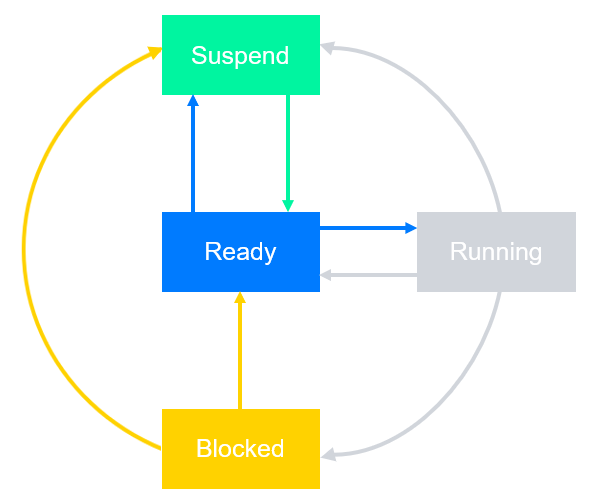
A FreeRTOS task transitions through four primary states during its existence, managed by the scheduler. Understanding these states is key to debugging and optimizing application timing.
The Four States
- Running:
- The task is currently being executed by the CPU.
- Only one task can be in the Running state at any given time (on a single core CPU).
- The scheduler chose this task because it was the highest-priority task in the Ready state.
- Ready:
- The task is fully prepared to execute (it is not blocked and not suspended).
- It is waiting for the CPU to become available.
- A Ready task will transition to the Running state if it is the highest priority task among all Ready tasks.
- Blocked:
- The task is waiting for a time event (e.g., a call to vTaskDelay()) or an external event (e.g., data from a queue, a semaphore release, or an interrupt).
- Blocked tasks are ignored by the scheduler and consume zero CPU time until the event occurs or the timeout expires.
- Suspended:
- The task is explicitly put into this state, usually for debugging or testing purposes, by another task calling vTaskSuspend().
- Unlike the Blocked state, a Suspended task will never be made Ready or Running, even if an event occurs. It can only be returned to the Ready state by a call to vTaskResume() or xTaskResumeFromISR().
7. Hands-On Lab: Implementing Multi-Tasking
This lab will demonstrate task pre-emption by creating two tasks that print different messages, configured to use heap_4.c for efficient memory management. For the sake of integration with CubeMX, CMSIS_V2 layer will be also used instead of the FreeRTOS API, so this table applies for a clear view on the equivalent API calls:
API Category | FreeRTOS API | CMSIS_RTOS API V1 | CMSIS_RTOS API V2 |
Kernel control | vTaskStartScheduler | osKernelStart | osKernelStart |
Thread management | xTaskCreate | osThreadCreate | osThreadNew |
More specifically:
- Create Task: osThreadId_t osThreadNew (osThreadFunc_t func, void *argument, const osThreadAttr_t * attr);
- Delete Task: osStatus osThreadTerminate (osThreadId thread_id);
- Get Task ID: osThreadId osThreadGetId (void);
- Task Handle Definition: osThreadId_t myTask01Handle;
- Create and Define Task: myTask01Handle = osThreadNew(StartTask01, NULL, &myTask01_attributes);
7.1 Code Example
Assume we have two prints, where the message will emulate the LED blink, printing (LED_A) and printing (LED_B). For more details on how to use prinff on STM32, refer to this article: – Hacker Embedded How to implement printf with STM32: Setup for STM32CubeIDE and VS Code
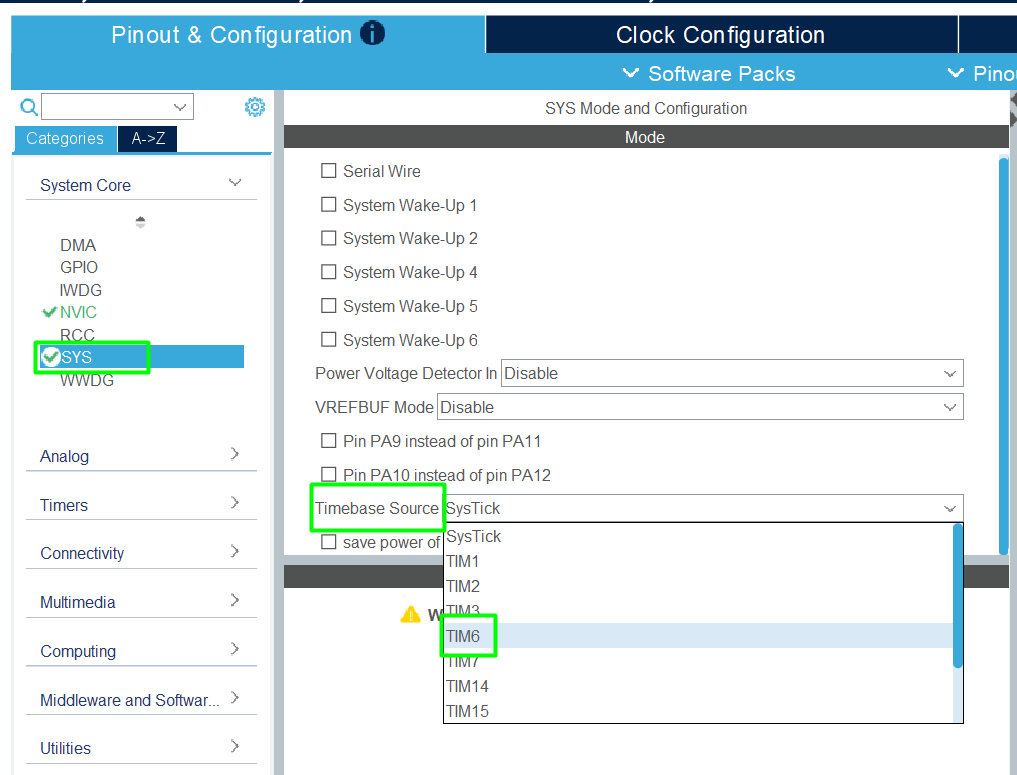
Create a new project, configure the UART and once that is done, It is strongly recommended to assign a TIMER to the HAL driver, instead of keeping the SYSTICK. To do so, change the Timebase Source here:
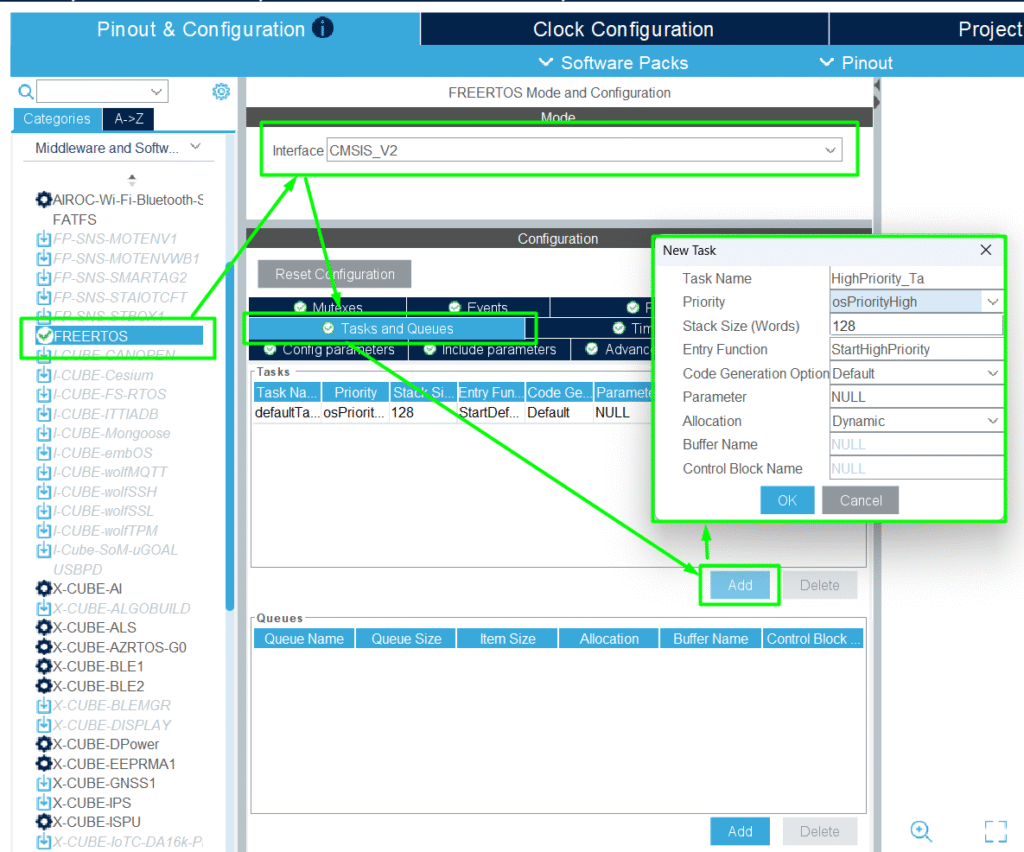
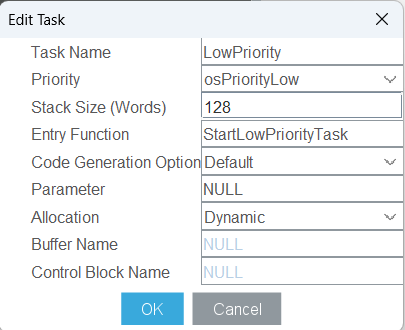
Add the FreeRTOS MW with CMSIS_V2, locate the Tab for Tasks and Queues and create the two tasks:
Generate the code and implement the low level printf() portion by adding the #include “stdio.h” and this low level putchar function:
Please note that the huart2 might not be the proper UART on your hardware.
On app_freertos.c, add the stdio.h and check the generated code and locate edit the content of the High and Low Priority tasks created:
8. Results
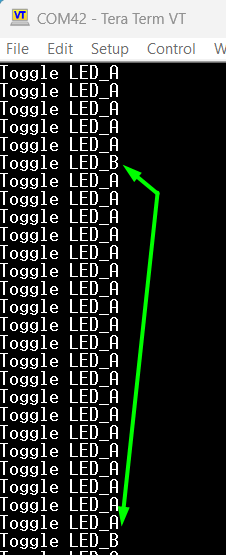
When the scheduler starts, the two tasks are initialized. The HighPriority_Task (Priority 3) will execute its loop, toggling LED_A every 50 milliseconds.
- Observation 1 (LED_A): LED_A will print quickly and consistently. Since this task is high-priority, it will be executed without interruption from the lower-priority task whenever it becomes ready.
- Observation 2 (LED_B): LED_B will print slowly (every 1 second), but its exact timing might be slightly delayed or jittered if the high-priority task is computation-intensive.
- Demonstration of Pre-emption: The 50ms delay in the high-priority task allows the scheduler to switch to the low-priority task. However, as soon as the 50ms expires, the high-priority task immediately becomes “Ready” and pre-empts the low-priority task, ensuring the high-priority task always meets its deadline.
This demonstrates the core concept of a real-time OS: higher priority tasks dictate CPU time to maintain deterministic behavior.
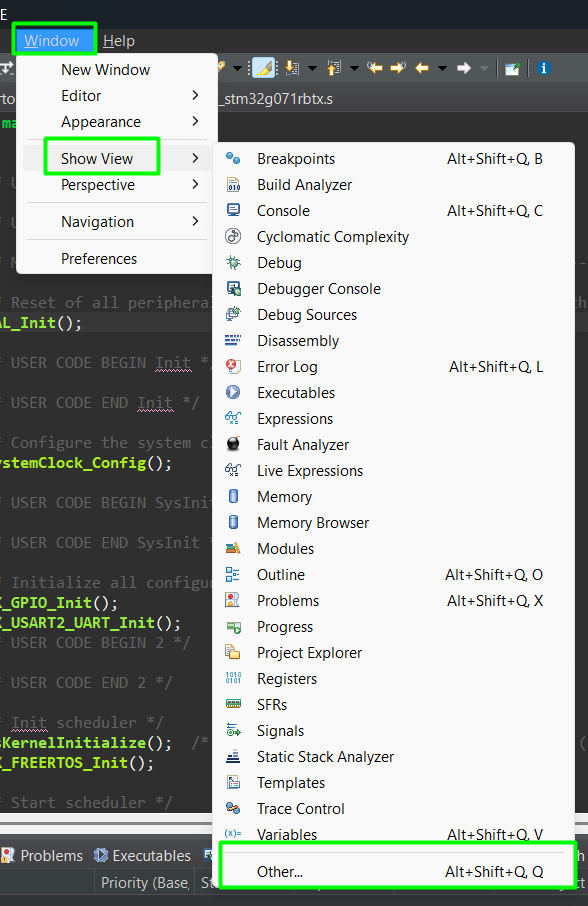
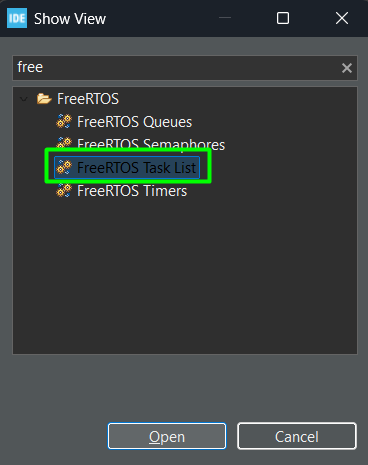
The CubeIDE has a ShowView menu for FreeRTOS. It can be added by clicking:
Be aware that it only updates if the program is paused:
9. Conclusion
Understanding FreeRTOS tasks and heap allocation is foundational for any embedded developer. We’ve established that each task requires a TCB and dedicated stack memory, and learned how to define tasks using xTaskCreate(). By selecting heap_4, we ensure reliable memory management by utilizing the best-fit algorithm with coalescing, minimizing the risk of memory fragmentation in long-running systems. Finally, mastering task priorities allows you to design a reliable system where critical operations are guaranteed to run when needed, successfully handling concurrency on resource-constrained microcontrollers like the STM32.