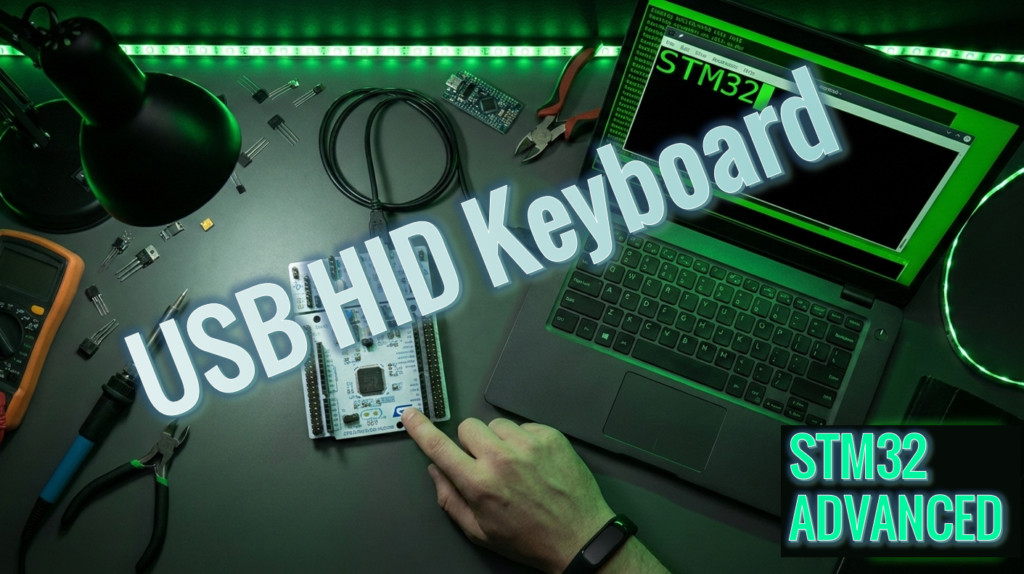
STM32 Tutorial: STM32 Keyboard USBX
Abstract
This article provides a comprehensive guide on using the STM32H5 microcontroller as a USB keyboard with the USBX stack. It includes detailed steps for setting up the development environment with STM32CubeIDE, configuring the USB peripheral, integrating USBX, and setting the USB device as a Human Interface Device (HID). Additionally, it explains how to write and implement the code for handling keyboard inputs and USB communication, followed by testing the keyboard functionality by compiling and uploading the firmware to the STM32H5 and verifying its recognition by a computer.
1. Introduction
In the realm of embedded systems, the ability to leverage USB connectivity for human interface devices is increasingly valuable. This article provides a step-by-step guide on how to achieve this, detailing the necessary configurations and adjustments using STM32CubeIDE and the USBX library. We will cover the integration of USBX, configuration of the USB peripheral, and implementation of code to handle keyboard inputs and USB communication. By the end of this guide, you will have a thorough understanding of how to transform your STM32H5 microcontroller into a fully functional USB keyboard.
This technical guide details the implementation of a USB Human Interface Device (HID) keyboard using the STM32H5 microcontroller and the Azure RTOS USBX stack. The article walks through the complete development lifecycle, starting with peripheral configuration in STM32CubeMX, including the critical setup of the ThreadX timebase and USB_DRD_FS interrupts.
Key technical aspects covered include:
Memory Allocation: Configuring the Packet Memory Area (PMA) for RX/TX endpoints.
Middleware Integration: Initializing the USBX device system stack and creating dedicated HID keyboard threads.
Firmware Logic: Implementing callback functions and event buffers to translate physical GPIO triggers (USER_BUTTON) into HID keyboard reports.
The tutorial culminates in a practical demonstration using the NUCLEO-H503RB board, providing developers with a robust framework for building custom USB peripherals on modern STM32 hardware.
2. Prerequisites
To get the most out of this tutorial, you should have a few tools ready:
- STM32CubeIDE & CubeMX: Basic familiarity with project generation.
- RTOS Basics: Understanding how to create tasks and set priorities.
- C Programming: Comfort with pointers and custom struct types.
- Hardware: Any STM32 development board with an easy access to USB (e.g., Nucleo boards with 144 pin or NUCLEO-H5 series).
3. Creating a STM32 Keyboard USBX
For this example, we will write “stm32” when we pressed the USER button.
3.1 Create a new project
Let us start creating a project for the STM32H503RBT6.
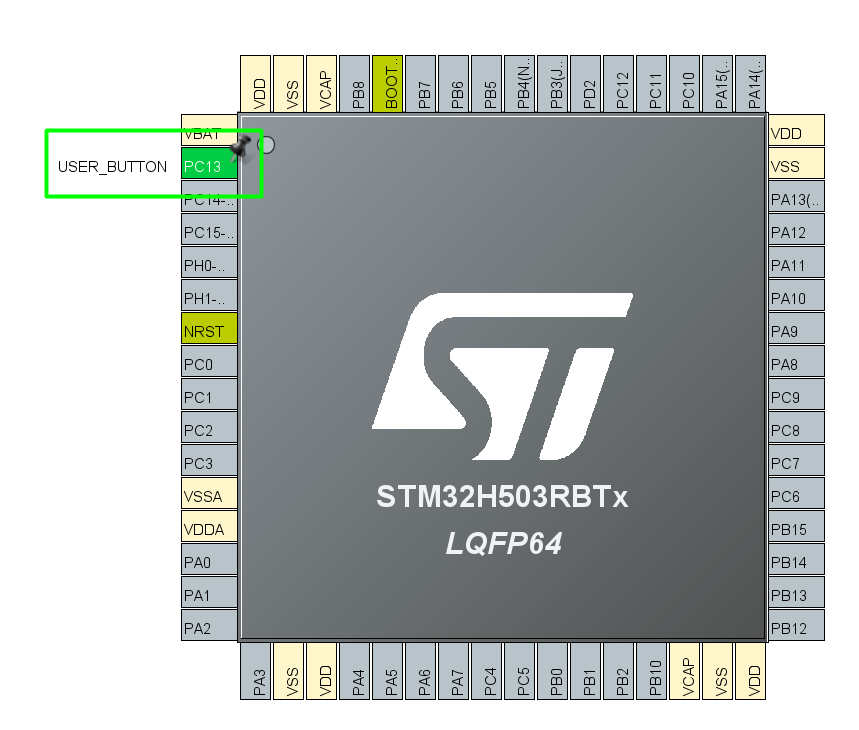
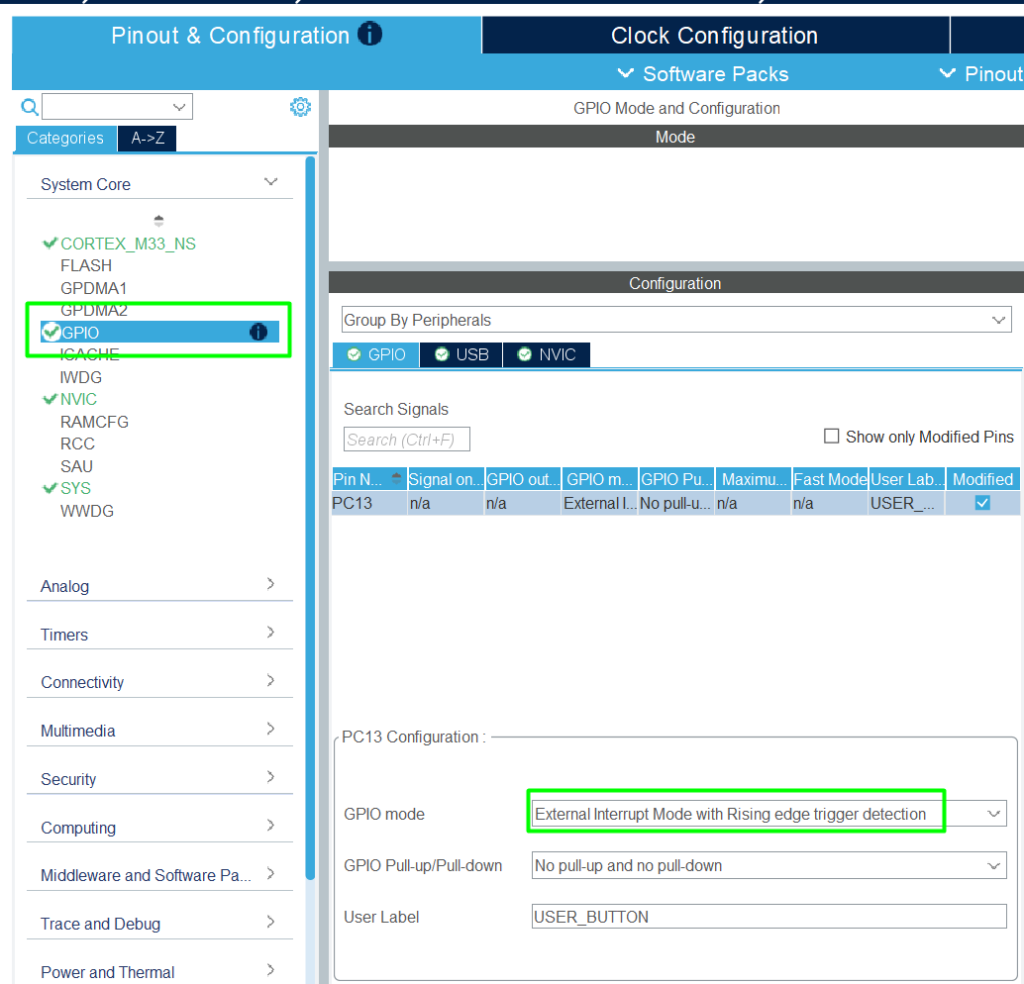
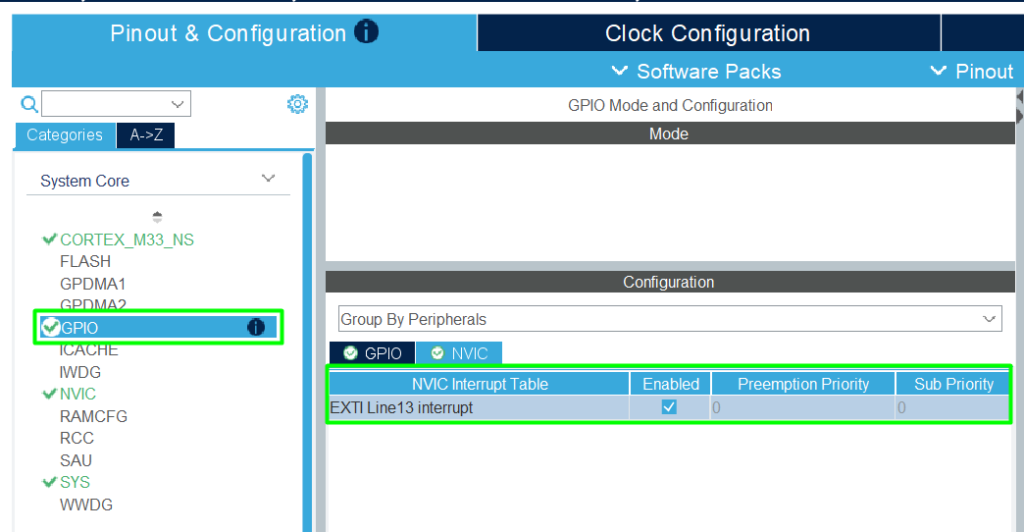
Before proceeding, ensure that the USER_BUTTON is on PC13 pin as EXTERNAL INTERRUPT on *ioc file.
3.2 Adding the USB HID Keyboard
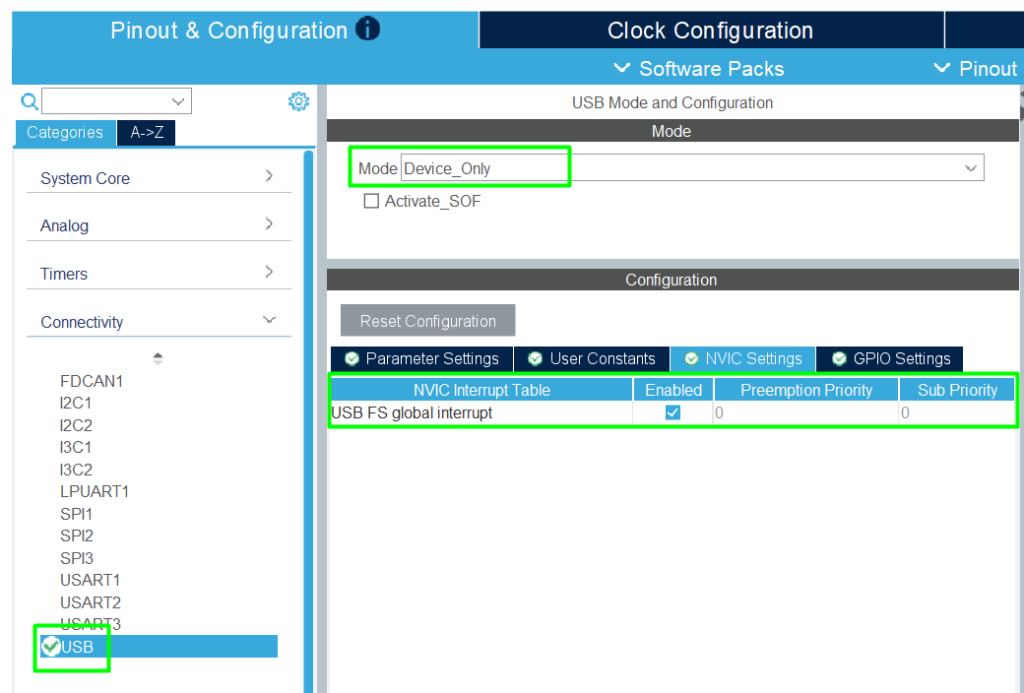
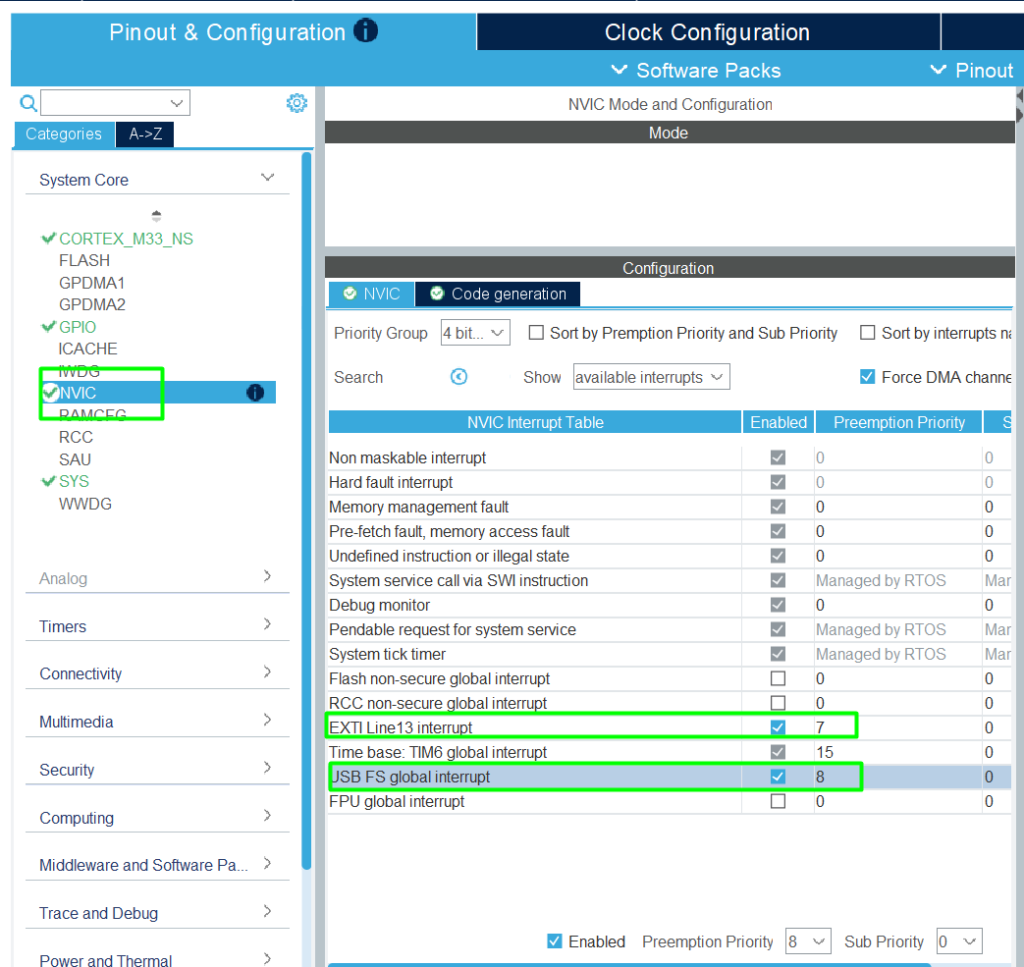
Now, we can configure the USB peripheral, THREADX and USBX stack HID as keyboard. So first enter in [CONNECTIVITY] -> [USB], configure USB with [Device_Only] and activate the USB interrupt.
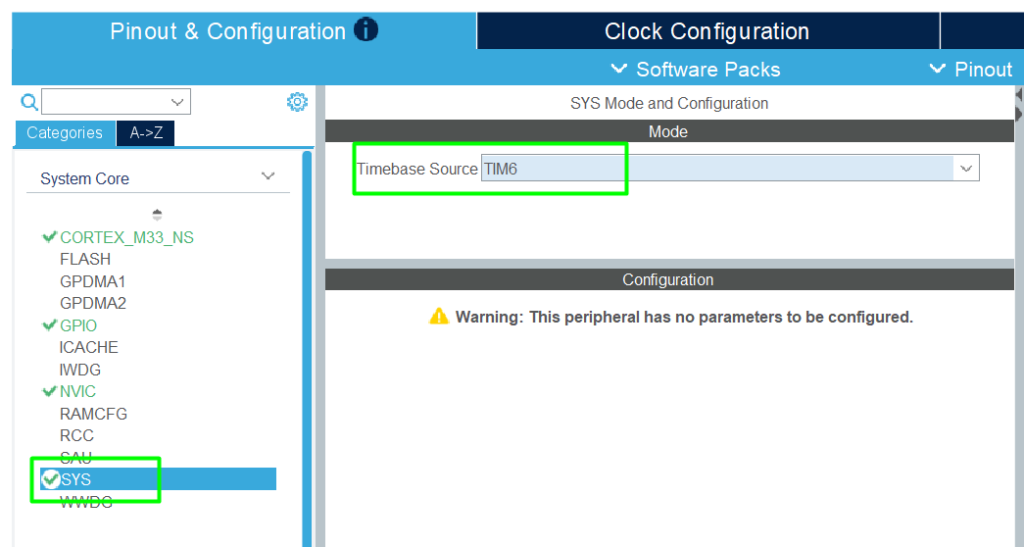
We can configure the ThreadX for USBX stack. So, first, we need to change the Timebase Source to TIM6, because ThreadX uses SysTick.
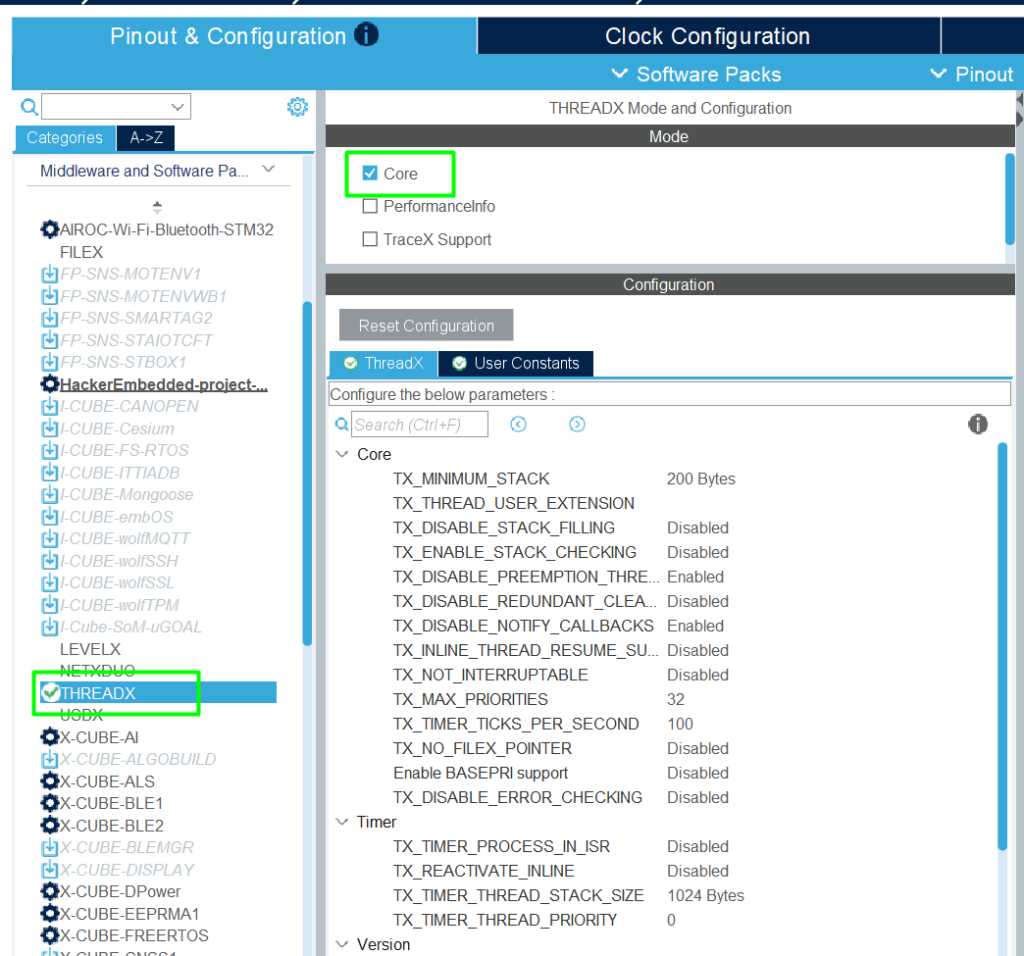
After that, go to [Middleware and Software] -> [ThreadX] and just check the Core checkbox.
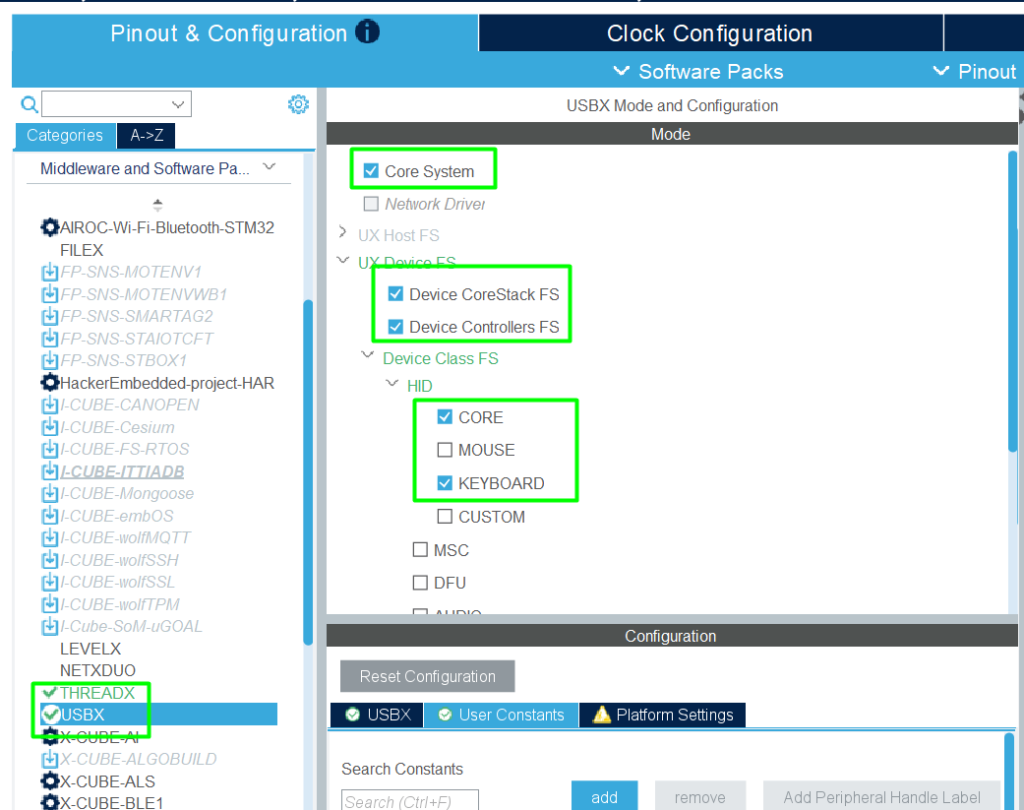
Now we can go to USBX and configure the USB as a HID Keyboard. So go to [Middleware and Software] -> [USBX] and configure the mode.
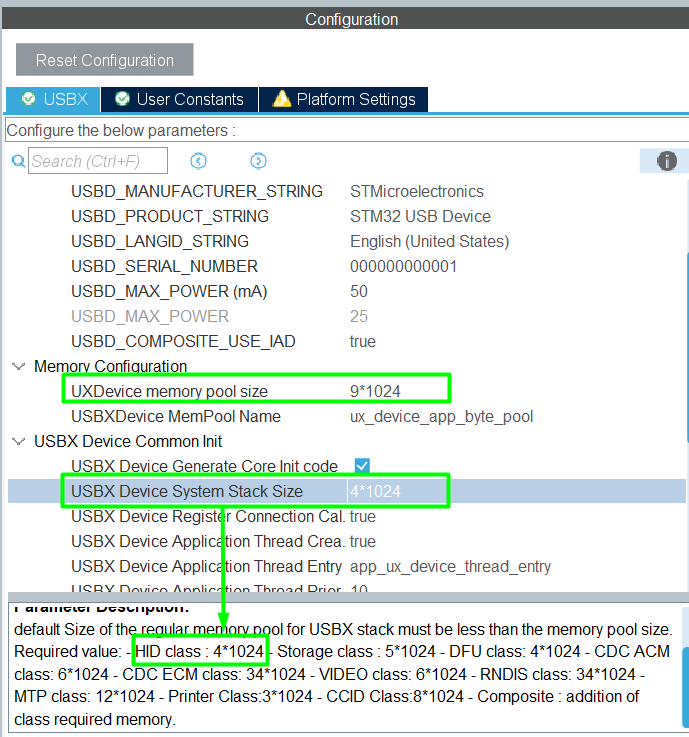
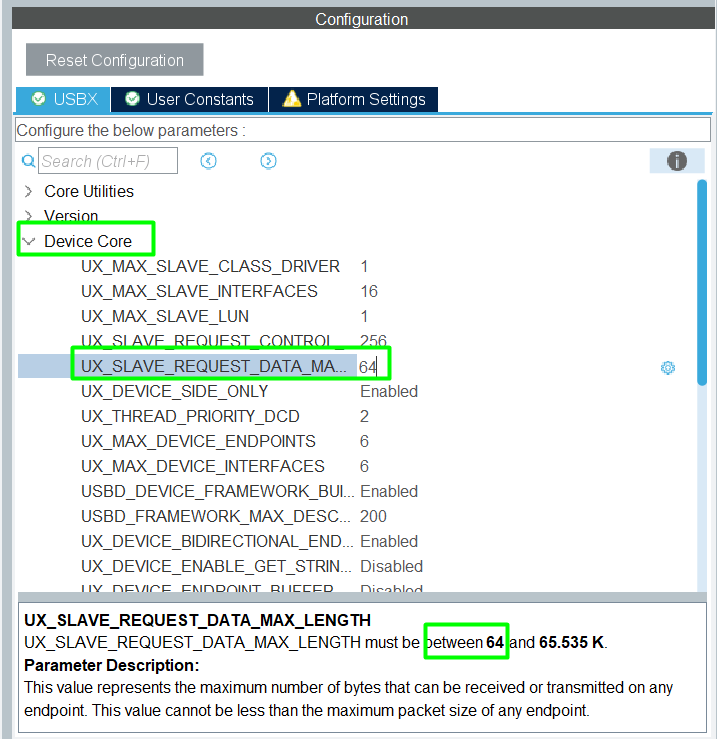
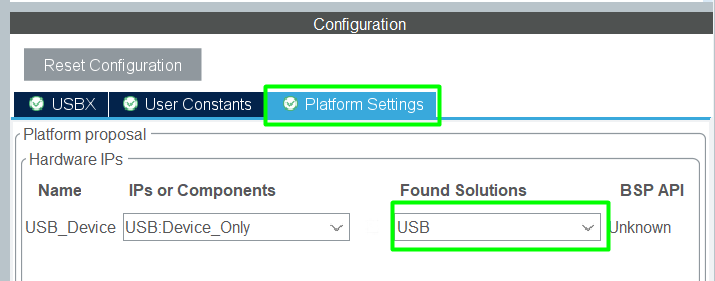
Afterwards, configure USBX configuration, the [USBX] and [Platform Settings] tab for HID Keyboard application. In [USBX] tab we need to configure three parameters, first one is [USBX Device System Stack Size] for HID class, another one is [UXDevice memory pool size] that size needs to be bigger than [USBX Device System Stack Size] and the last is [UX_SLAVE_REQUEST_DATA_MAX_LENGTH].
Adjust the NVIC priorities:
3.3 Clock Configuration
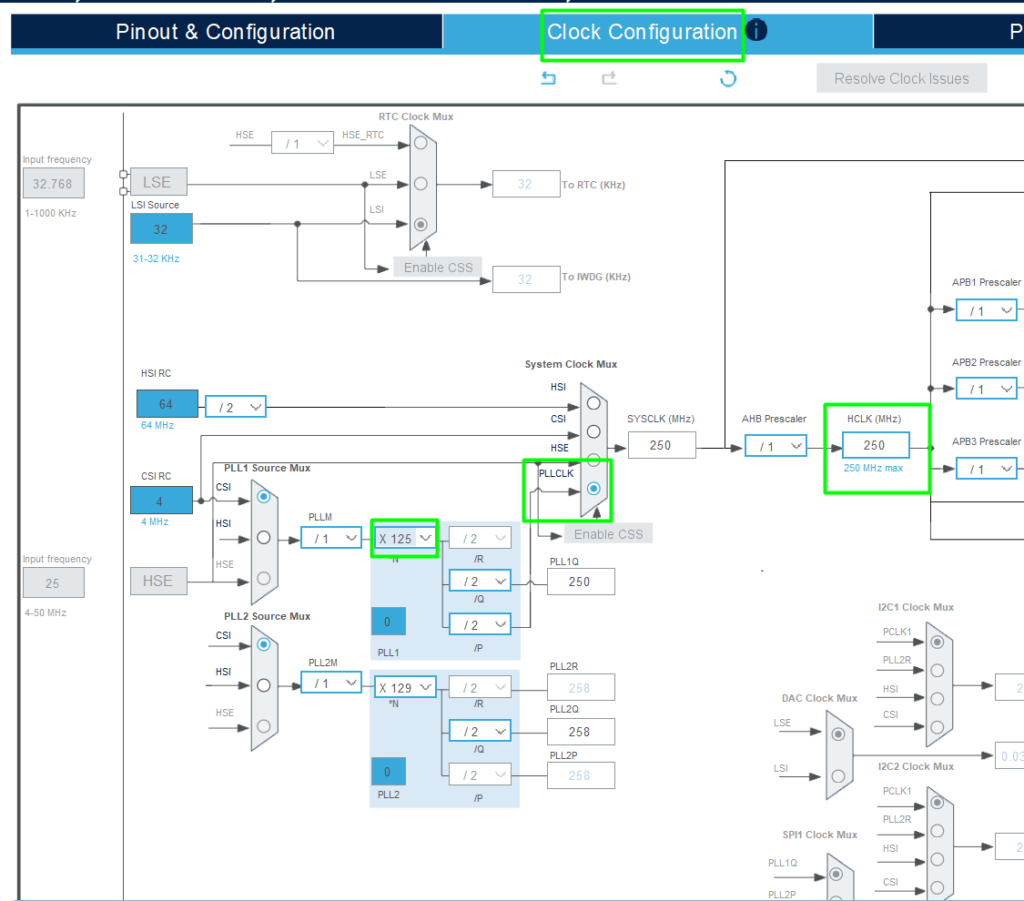
Change to the [Clock Configuration] tab and change the [HCLK] to 250 and click enter, it will automatically adjust the clock tree.
The USB, when operating as Device Only, can use the Start Of Frame (SOF) to adjust the clock, which allows the MCU to use the internal clocks.
3.4 Project Generation
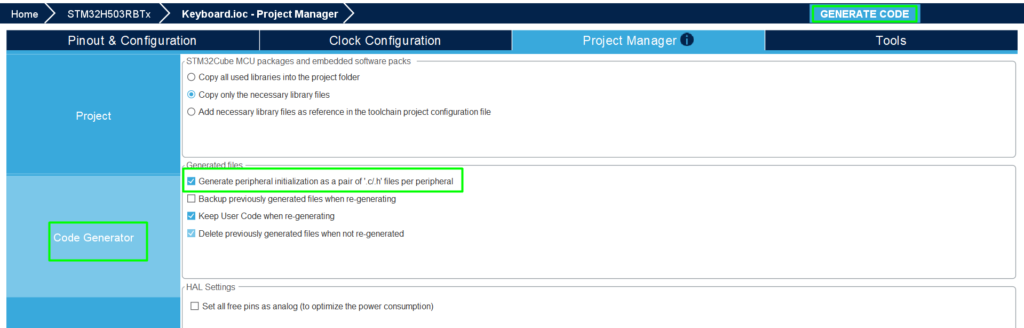
Now configure to generate peripheral initialization as a pair of ‘.c/.h’ files per peripheral in the [Project Manager] -> [Code Generator].
Then you can save and click the [Code generation] button.
4. STM32 Keyboard USBX - Code editing
In the app_usbx_device.c file, found under USBX/App folder, use the USER code sections to locate where you should insert the code snippets in your application:
					/* USER CODE BEGIN Header */
/**
  ******************************************************************************
  * @file    app_usbx_device.c
  * @author  MCD Application Team
  * @brief   USBX Device applicative file
  ******************************************************************************
    * @attention
  *
  * Copyright (c) 2026 STMicroelectronics.
  * All rights reserved.
  *
  * This software is licensed under terms that can be found in the LICENSE file
  * in the root directory of this software component.
  * If no LICENSE file comes with this software, it is provided AS-IS.
  *
  ******************************************************************************
  */
/* USER CODE END Header */

/* Includes ------------------------------------------------------------------*/
#include "app_usbx_device.h"

/* Private includes ----------------------------------------------------------*/
/* USER CODE BEGIN Includes */
#include "usb.h"
/* USER CODE END Includes */

/* Private typedef -----------------------------------------------------------*/
/* USER CODE BEGIN PTD */

/* USER CODE END PTD */

/* Private define ------------------------------------------------------------*/
/* USER CODE BEGIN PD */

/* USER CODE END PD */

/* Private macro -------------------------------------------------------------*/
/* USER CODE BEGIN PM */

/* USER CODE END PM */

/* Private variables ---------------------------------------------------------*/

static ULONG hid_keyboard_interface_number;
static ULONG hid_keyboard_configuration_number;
static UX_SLAVE_CLASS_HID_PARAMETER hid_keyboard_parameter;
static TX_THREAD ux_device_app_thread;

/* USER CODE BEGIN PV */
TX_THREAD ux_hid_Keyboard_thread;
extern uint8_t User_Button_State;
extern PCD_HandleTypeDef hpcd_USB_DRD_FS;
/* USER CODE END PV */

/* Private function prototypes -----------------------------------------------*/
static VOID app_ux_device_thread_entry(ULONG thread_input);
static UINT USBD_ChangeFunction(ULONG Device_State);
/* USER CODE BEGIN PFP */

/* USER CODE END PFP */

/**
  * @brief  Application USBX Device Initialization.
  * @param  memory_ptr: memory pointer
  * @retval status
  */

UINT MX_USBX_Device_Init(VOID *memory_ptr)
{
   UINT ret = UX_SUCCESS;
  UCHAR *device_framework_high_speed;
  UCHAR *device_framework_full_speed;
  ULONG device_framework_hs_length;
  ULONG device_framework_fs_length;
  ULONG string_framework_length;
  ULONG language_id_framework_length;
  UCHAR *string_framework;
  UCHAR *language_id_framework;

  UCHAR *pointer;
  TX_BYTE_POOL *byte_pool = (TX_BYTE_POOL*)memory_ptr;

  /* USER CODE BEGIN MX_USBX_Device_Init0 */

  /* USER CODE END MX_USBX_Device_Init0 */
  /* Allocate the stack for USBX Memory */
  if (tx_byte_allocate(byte_pool, (VOID **) &pointer,
                       USBX_DEVICE_MEMORY_STACK_SIZE, TX_NO_WAIT) != TX_SUCCESS)
  {
    /* USER CODE BEGIN USBX_ALLOCATE_STACK_ERROR */
    return TX_POOL_ERROR;
    /* USER CODE END USBX_ALLOCATE_STACK_ERROR */
  }

  /* Initialize USBX Memory */
  if (ux_system_initialize(pointer, USBX_DEVICE_MEMORY_STACK_SIZE, UX_NULL, 0) != UX_SUCCESS)
  {
    /* USER CODE BEGIN USBX_SYSTEM_INITIALIZE_ERROR */
    return UX_ERROR;
    /* USER CODE END USBX_SYSTEM_INITIALIZE_ERROR */
  }

  /* Get Device Framework High Speed and get the length */
  device_framework_high_speed = USBD_Get_Device_Framework_Speed(USBD_HIGH_SPEED,
                                                                &device_framework_hs_length);

  /* Get Device Framework Full Speed and get the length */
  device_framework_full_speed = USBD_Get_Device_Framework_Speed(USBD_FULL_SPEED,
                                                                &device_framework_fs_length);

  /* Get String Framework and get the length */
  string_framework = USBD_Get_String_Framework(&string_framework_length);

  /* Get Language Id Framework and get the length */
  language_id_framework = USBD_Get_Language_Id_Framework(&language_id_framework_length);

  /* Install the device portion of USBX */
  if (ux_device_stack_initialize(device_framework_high_speed,
                                 device_framework_hs_length,
                                 device_framework_full_speed,
                                 device_framework_fs_length,
                                 string_framework,
                                 string_framework_length,
                                 language_id_framework,
                                 language_id_framework_length,
                                 USBD_ChangeFunction) != UX_SUCCESS)
  {
    /* USER CODE BEGIN USBX_DEVICE_INITIALIZE_ERROR */
    return UX_ERROR;
    /* USER CODE END USBX_DEVICE_INITIALIZE_ERROR */
  }

  /* Initialize the hid keyboard class parameters for the device */
  hid_keyboard_parameter.ux_slave_class_hid_instance_activate         = USBD_HID_Keyboard_Activate;
  hid_keyboard_parameter.ux_slave_class_hid_instance_deactivate       = USBD_HID_Keyboard_Deactivate;
  hid_keyboard_parameter.ux_device_class_hid_parameter_report_address = USBD_HID_ReportDesc(INTERFACE_HID_KEYBOARD);
  hid_keyboard_parameter.ux_device_class_hid_parameter_report_length  = USBD_HID_ReportDesc_length(INTERFACE_HID_KEYBOARD);
  hid_keyboard_parameter.ux_device_class_hid_parameter_report_id      = UX_FALSE;
  hid_keyboard_parameter.ux_device_class_hid_parameter_callback       = USBD_HID_Keyboard_SetReport;
  hid_keyboard_parameter.ux_device_class_hid_parameter_get_callback   = USBD_HID_Keyboard_GetReport;

  /* USER CODE BEGIN HID_KEYBOARD_PARAMETER */

  /* USER CODE END HID_KEYBOARD_PARAMETER */

  /* Get hid keyboard configuration number */
  hid_keyboard_configuration_number = USBD_Get_Configuration_Number(CLASS_TYPE_HID, INTERFACE_HID_KEYBOARD);

  /* Find hid keyboard interface number */
  hid_keyboard_interface_number = USBD_Get_Interface_Number(CLASS_TYPE_HID, INTERFACE_HID_KEYBOARD);

  /* Initialize the device hid keyboard class */
  if (ux_device_stack_class_register(_ux_system_slave_class_hid_name,
                                     ux_device_class_hid_entry,
                                     hid_keyboard_configuration_number,
                                     hid_keyboard_interface_number,
                                     &hid_keyboard_parameter) != UX_SUCCESS)
  {
    /* USER CODE BEGIN USBX_DEVICE_HID_KEYBOARD_REGISTER_ERROR */
    return UX_ERROR;
    /* USER CODE END USBX_DEVICE_HID_KEYBOARD_REGISTER_ERROR */
  }

  /* Allocate the stack for device application main thread */
  if (tx_byte_allocate(byte_pool, (VOID **) &pointer, UX_DEVICE_APP_THREAD_STACK_SIZE,
                       TX_NO_WAIT) != TX_SUCCESS)
  {
    /* USER CODE BEGIN MAIN_THREAD_ALLOCATE_STACK_ERROR */
    return TX_POOL_ERROR;
    /* USER CODE END MAIN_THREAD_ALLOCATE_STACK_ERROR */
  }

  /* Create the device application main thread */
  if (tx_thread_create(&ux_device_app_thread, UX_DEVICE_APP_THREAD_NAME, app_ux_device_thread_entry,
                       0, pointer, UX_DEVICE_APP_THREAD_STACK_SIZE, UX_DEVICE_APP_THREAD_PRIO,
                       UX_DEVICE_APP_THREAD_PREEMPTION_THRESHOLD, UX_DEVICE_APP_THREAD_TIME_SLICE,
                       UX_DEVICE_APP_THREAD_START_OPTION) != TX_SUCCESS)
  {
    /* USER CODE BEGIN MAIN_THREAD_CREATE_ERROR */
    return TX_THREAD_ERROR;
    /* USER CODE END MAIN_THREAD_CREATE_ERROR */
  }

  /* USER CODE BEGIN MX_USBX_Device_Init1 */
  /* Allocate the stack for usbx hid keyboard thread */
  if (tx_byte_allocate(byte_pool, (VOID **) &pointer, 1024, TX_NO_WAIT) != UX_SUCCESS)
  {
    return TX_POOL_ERROR;
  }

  /* Create the  usbx hid keyboard thread */
  if (tx_thread_create(&ux_hid_Keyboard_thread, "ux_hid_Keyboard_thread_read_entry",
                       usbx_hid_keyboard_thread_entry, 0, pointer, 1024,
                       20, 20, TX_NO_TIME_SLICE, TX_AUTO_START) != UX_SUCCESS)
  {
    return TX_THREAD_ERROR;
  }
  /* USER CODE END MX_USBX_Device_Init1 */

  return ret;
}

/**
  * @brief  Function implementing app_ux_device_thread_entry.
  * @param  thread_input: User thread input parameter.
  * @retval none
  */
static VOID app_ux_device_thread_entry(ULONG thread_input)
{
  /* USER CODE BEGIN app_ux_device_thread_entry */
	/* USB_DRD_FS init function */
	MX_USB_PCD_Init();

	/* USER CODE BEGIN USB_Device_Init_PreTreatment_1 */
	/*Control IN/OUT Endpoints (0x00 and 0x80)*/
	HAL_PCDEx_PMAConfig(&hpcd_USB_DRD_FS, 0x00, PCD_SNG_BUF, 0x40);
	HAL_PCDEx_PMAConfig(&hpcd_USB_DRD_FS, 0x80, PCD_SNG_BUF, 0x80);

	/*Data OUT Endpoints*/
	HAL_PCDEx_PMAConfig(&hpcd_USB_DRD_FS, USBD_HID_KEYBOARD_EPIN_ADDR, PCD_SNG_BUF, 0xC0);
	/* USER CODE END USB_Device_Init_PreTreatment_1 */

	/* initialize the device controller driver*/
	ux_dcd_stm32_initialize((ULONG)USB_DRD_FS, (ULONG)&hpcd_USB_DRD_FS);

	HAL_PCD_Start(&hpcd_USB_DRD_FS);
  /* USER CODE END app_ux_device_thread_entry */
}

/**
  * @brief  USBD_ChangeFunction
  *         This function is called when the device state changes.
  * @param  Device_State: USB Device State
  * @retval status
  */
static UINT USBD_ChangeFunction(ULONG Device_State)
{
   UINT status = UX_SUCCESS;

  /* USER CODE BEGIN USBD_ChangeFunction0 */

  /* USER CODE END USBD_ChangeFunction0 */

  switch (Device_State)
  {
    case UX_DEVICE_ATTACHED:

      /* USER CODE BEGIN UX_DEVICE_ATTACHED */

      /* USER CODE END UX_DEVICE_ATTACHED */

      break;

    case UX_DEVICE_REMOVED:

      /* USER CODE BEGIN UX_DEVICE_REMOVED */

      /* USER CODE END UX_DEVICE_REMOVED */

      break;

    case UX_DCD_STM32_DEVICE_CONNECTED:

      /* USER CODE BEGIN UX_DCD_STM32_DEVICE_CONNECTED */

      /* USER CODE END UX_DCD_STM32_DEVICE_CONNECTED */

      break;

    case UX_DCD_STM32_DEVICE_DISCONNECTED:

      /* USER CODE BEGIN UX_DCD_STM32_DEVICE_DISCONNECTED */

      /* USER CODE END UX_DCD_STM32_DEVICE_DISCONNECTED */

      break;

    case UX_DCD_STM32_DEVICE_SUSPENDED:

      /* USER CODE BEGIN UX_DCD_STM32_DEVICE_SUSPENDED */

      /* USER CODE END UX_DCD_STM32_DEVICE_SUSPENDED */

      break;

    case UX_DCD_STM32_DEVICE_RESUMED:

      /* USER CODE BEGIN UX_DCD_STM32_DEVICE_RESUMED */

      /* USER CODE END UX_DCD_STM32_DEVICE_RESUMED */

      break;

    case UX_DCD_STM32_SOF_RECEIVED:

      /* USER CODE BEGIN UX_DCD_STM32_SOF_RECEIVED */

      /* USER CODE END UX_DCD_STM32_SOF_RECEIVED */

      break;

    default:

      /* USER CODE BEGIN DEFAULT */

      /* USER CODE END DEFAULT */

      break;

  }

  /* USER CODE BEGIN USBD_ChangeFunction1 */

  /* USER CODE END USBD_ChangeFunction1 */

  return status;
}
/* USER CODE BEGIN 1 */
void HAL_GPIO_EXTI_Rising_Callback(uint16_t GPIO_Pin)
{

  /* Check if EXTI from User Button */
if (GPIO_Pin == USER_BUTTON_Pin)
  {
    User_Button_State ^= 1U;
  }
}
/* USER CODE END 1 */
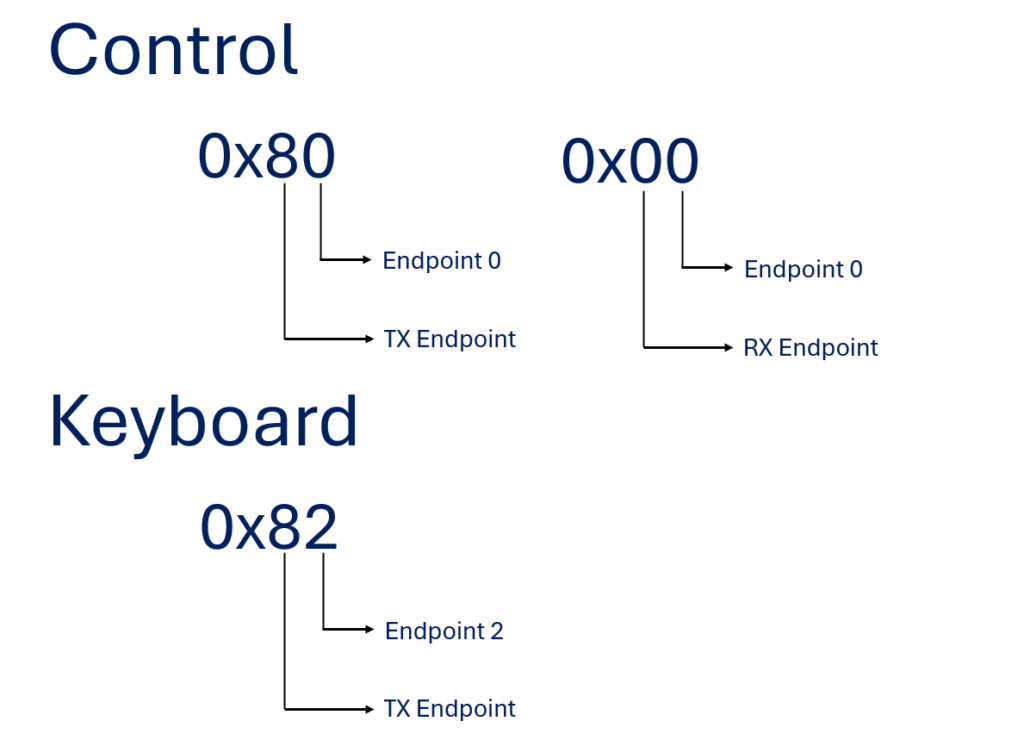
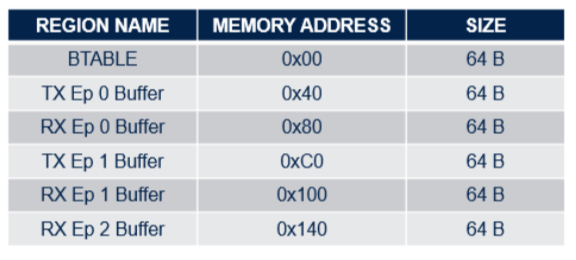
If you look, we are creating a thread named usbx_hid_keyboard_thread_entry that will be responsible for sending keyboard data. In the HAL_PCDEx_PMAConfig function, it’s important to highlight why we put these addresses. The first address is to identify if the Endpoint is RX or TX and the last address in the function is to specify where in USB RAM will the Endpoint be allocated. Below, there are two images to understand better this concepts.
Explanation of first address in HAL_PCDEx_PMAConfig function
Reference table for second address in HAL_PCDEx_PMAConfig function
At least, in the ux_device_keyboard.h and ux_device_keyboard.c files use the USER code sections to locate where you should insert the code snippets in your application:
ux_device_keyboard.h
					/* USER CODE BEGIN Includes */
#include "main.h"
/* USER CODE END Includes */

/* USER CODE BEGIN EFP */
VOID usbx_hid_keyboard_thread_entry(ULONG thread_input);
/* USER CODE END EFP */

/* USER CODE BEGIN PD */
#define KEY_S 0x16 // Keyboard s and S
#define KEY_T 0x17 // Keyboard t and T
#define KEY_M 0x10 // Keyboard m and M
#define KEY_3 0x20 // Keyboard 3 and #
#define KEY_2 0x1f // Keyboard 2 and @
/* USER CODE END PD */
ux_device_keyboard.c
					/* USER CODE BEGIN Header */
/**
  ******************************************************************************
  * @file    ux_device_keyboard.c
  * @author  MCD Application Team
  * @brief   USBX Device HID Keyboard applicative source file
  ******************************************************************************
  * @attention
  *
  * Copyright (c) 2022 STMicroelectronics.
  * All rights reserved.
  *
  * This software is licensed under terms that can be found in the LICENSE file
  * in the root directory of this software component.
  * If no LICENSE file comes with this software, it is provided AS-IS.
  *
  ******************************************************************************
  */
/* USER CODE END Header */

/* Includes ------------------------------------------------------------------*/
#include "ux_device_keyboard.h"

/* Private includes ----------------------------------------------------------*/
/* USER CODE BEGIN Includes */

/* USER CODE END Includes */

/* Private typedef -----------------------------------------------------------*/
/* USER CODE BEGIN PTD */

/* USER CODE END PTD */

/* Private define ------------------------------------------------------------*/
/* USER CODE BEGIN PD */

/* USER CODE END PD */

/* Private macro -------------------------------------------------------------*/
/* USER CODE BEGIN PM */

/* USER CODE END PM */

/* Private variables ---------------------------------------------------------*/
/* USER CODE BEGIN PV */
UX_SLAVE_CLASS_HID *hid_keyboard;
__IO uint8_t User_Button_State = 0U;
/* USER CODE END PV */

/* Private function prototypes -----------------------------------------------*/
/* USER CODE BEGIN PFP */

/* USER CODE END PFP */

/* Private user code ---------------------------------------------------------*/
/* USER CODE BEGIN 0 */
static VOID GetKeyData(UX_SLAVE_CLASS_HID_EVENT *hid_event);

/* USER CODE END 0 */

/**
  * @brief  USBD_HID_Keyboard_Activate
  *         This function is called when insertion of a HID Keyboard device.
  * @param  hid_instance: Pointer to the hid class instance.
  * @retval none
  */
VOID USBD_HID_Keyboard_Activate(VOID *hid_instance)
{
  /* USER CODE BEGIN USBD_HID_Keyboard_Activate */
	/* Save the HID keyboard instance */
	hid_keyboard = (UX_SLAVE_CLASS_HID*) hid_instance;
  /* USER CODE END USBD_HID_Keyboard_Activate */

  return;
}

/**
  * @brief  USBD_HID_Keyboard_Deactivate
  *         This function is called when extraction of a HID Keyboard device.
  * @param  hid_instance: Pointer to the hid class instance.
  * @retval none
  */
VOID USBD_HID_Keyboard_Deactivate(VOID *hid_instance)
{
  /* USER CODE BEGIN USBD_HID_Keyboard_Deactivate */
  UX_PARAMETER_NOT_USED(hid_instance);
  /* USER CODE END USBD_HID_Keyboard_Deactivate */

  return;
}

/**
  * @brief  USBD_HID_Keyboard_SetReport
  *         This function is invoked when the host sends a HID SET_REPORT
  *         to the application over Endpoint 0.
  * @param  hid_instance: Pointer to the hid class instance.
  * @param  hid_event: Pointer to structure of the hid event.
  * @retval status
  */
UINT USBD_HID_Keyboard_SetReport(UX_SLAVE_CLASS_HID *hid_instance,
                                 UX_SLAVE_CLASS_HID_EVENT *hid_event)
{
  UINT status = UX_SUCCESS;

  /* USER CODE BEGIN USBD_HID_Keyboard_SetReport */
  UX_PARAMETER_NOT_USED(hid_instance);
  UX_PARAMETER_NOT_USED(hid_event);
  /* USER CODE END USBD_HID_Keyboard_SetReport */

  return status;
}

/**
  * @brief  USBD_HID_Keyboard_GetReport
  *         This function is invoked when host is requesting event through
  *         control GET_REPORT request.
  * @param  hid_instance: Pointer to the hid class instance.
  * @param  hid_event: Pointer to structure of the hid event.
  * @retval status
  */
UINT USBD_HID_Keyboard_GetReport(UX_SLAVE_CLASS_HID *hid_instance,
                                 UX_SLAVE_CLASS_HID_EVENT *hid_event)
{
  UINT status = UX_SUCCESS;

  /* USER CODE BEGIN USBD_HID_Keyboard_GetReport */
  UX_PARAMETER_NOT_USED(hid_instance);
  UX_PARAMETER_NOT_USED(hid_event);
  /* USER CODE END USBD_HID_Keyboard_GetReport */

  return status;
}

/* USER CODE BEGIN 1 */
/**
  * @brief  Function implementing usbx_hid_keyboard_thread_entry.
  * @param  thread_input: not used
  * @retval none
  */
VOID usbx_hid_keyboard_thread_entry(ULONG thread_input)
{
  UX_SLAVE_DEVICE *device;
  UX_SLAVE_CLASS_HID_EVENT hid_event;

  TX_PARAMETER_NOT_USED(thread_input);

  /* Get the pointer to the device */
  device = &_ux_system_slave -> ux_system_slave_device;

  /* Reset the HID event structure */
  ux_utility_memory_set(&hid_event, 0, sizeof(UX_SLAVE_CLASS_HID_EVENT));

  while (1)
  {
    /* Check if the device state already configured */
    if ((device->ux_slave_device_state == UX_DEVICE_CONFIGURED) && (hid_keyboard != UX_NULL))
    {
      /* Sleep Thread for 20ms */
      tx_thread_sleep(MS_TO_TICK(20));

      /* Check if user button is pressed */
      if (User_Button_State)
      {
        /* Get the key button */
        GetKeyData(&hid_event);

        /* Send keyboard event */
        ux_device_class_hid_event_set(hid_keyboard, &hid_event);


        /* Next event has the key button depressed */
		hid_event.ux_device_class_hid_event_buffer[3] = 0;
        hid_event.ux_device_class_hid_event_buffer[4] = 0;
        hid_event.ux_device_class_hid_event_buffer[5] = 0;
        hid_event.ux_device_class_hid_event_buffer[6] = 0;
        hid_event.ux_device_class_hid_event_buffer[7] = 0;
//        hid_event.ux_device_class_hid_event_buffer[8] = 0;

        /* Set hid envent length to 8 */
        hid_event.ux_device_class_hid_event_length = 8;

        /* Send keyboard event */
        ux_device_class_hid_event_set(hid_keyboard, &hid_event);

        /* Reset User Button state */
        User_Button_State = 0;
      }
    }
    else
    {
      /* Sleep thread for 10ms */
      tx_thread_sleep(MS_TO_TICK(10));
    }
  }
}


/**
  * @brief  GetKeyData
  *         Gets Pointer Data.
  * @param  hid_event: Pointer to hid event buffer.
  * @retval none
  */
static VOID GetKeyData(UX_SLAVE_CLASS_HID_EVENT *hid_event)
{
  /* Set hid envent length to 8 */
  hid_event->ux_device_class_hid_event_length = 8;

  /* This byte is a modifier byte */
  hid_event->ux_device_class_hid_event_buffer[0] = 0;

  /* This byte is reserved */
  hid_event->ux_device_class_hid_event_buffer[1] = 0;

  /* Update key button byte */
  hid_event->ux_device_class_hid_event_buffer[3] = KEY_S;
  hid_event->ux_device_class_hid_event_buffer[4] = KEY_T;
  hid_event->ux_device_class_hid_event_buffer[5] = KEY_M;
  hid_event->ux_device_class_hid_event_buffer[6] = KEY_3;
  hid_event->ux_device_class_hid_event_buffer[7] = KEY_2;
}

/* USER CODE END 1 */
That concludes our example code for STM32CubeIDE. Now, you only need to connect your NUCLEO-H503RB to two USB cables, one in the STLINK USB and another one in USER_USB. After that, you can start debugging.
By following these steps, you should be able to observe the NUCLEO board typing “STM32” when you press the USER BUTTON. Make sure to have a notepad or similar open, so you can see the word.
5. Hands-On Validation
After following the steps outlined in this guide, you should observe the following outcomes: Upon building the project and entering the debug session, the NUCLEO-H503RB board will be configured to simulate a keyboard and write “STM32”. By opening any notepad and connecting both USB cables, pressing the USER_BUTTON will result in “STM32” being typed.
Its also possible to view the newly added Keyboard with the PID and VID in the Device Manager.
6. Conclusion
In this article, we explored how to use the STM32 microcontrollers as a keyboard, specifically with the NUCLEO-H503RB board. We provided a step-by-step guide on setting up the necessary threads, configuring the USB endpoints, and connecting the board properly in STM32CubeIDE.
7. Related Links
Related links
Here are some related links that contain the material that was used to create this article and can be helpful in your developments.
Introduction to Azure RTOS® with STM32
How to implement the USB device composite class in STM32 using the Azure package
Implementing a USB HID keyboard device from a USB … – STMicroelectronics Community