STM32 Tutorial: Programming External Memories on STM32 via STM32CubeProgrammer CLI
Abstract
This article presents a comprehensive guide for programming external memory devices (e.g., QSPI Flash) connected to an STM32 microcontroller using the STM32CubeProgrammer Command-Line Interface (CLI). The process leverages an External Loader (.stldr) to initialize and control the off-chip memory interface, enabling streamlined download operations. We detail the necessary command structure, including the crucial -el parameter, to ensure reliable, verifiable, and automated firmware deployment, suitable for integration into automated testing and production environments.
1. Introduction
Modern embedded systems often require storage beyond the internal Flash memory of the microcontroller. External Non-Volatile Memory (e.g., QSPI Flash, external NOR/NAND Flash) is routinely used to hold large assets, application firmware components, or configuration data.
The STM32CubeProgrammer (STM32CubeProg) provides a powerful Command-Line Interface (CLI) for automating programming tasks. When targeting external memory, the process requires a specific component known as an External Loader (.stldr) to bridge the communication gap between the programming tool and the off-chip device. This article details the steps and commands necessary to program external memories using the CLI.
The External Loader: The Key to Off-Chip Programming
Unlike programming internal Flash, which is handled natively by the STM32’s internal routines, accessing external memories requires the host application (STM32CubeProg) to upload and execute a small piece of dedicated code on the target MCU first. This code is the External Loader (.stldr).
The External Loader is an MCU-specific driver compiled into a proprietary format. Its function is to initialize the external memory interface (like QSPI, FMC, or SPI), and then provide low-level routines for erasing, writing, and reading the external memory. The STM32CubeProgrammer downloads this loader to the MCU’s SRAM, executes it, and then uses it to perform the requested programming operations on the external chip.
2. Prerequisites
Before starting the programming process, ensure you have the following:
STM32CubeProgrammer Installed: The
STM32_Programmer.exeexecutable must be installed on your system.Target STM32 Device: The microcontroller board must be connected via a debug probe (ST-Link, J-Link, etc.).
External Loader File (
.stldr): The correct loader file for your specific external memory chip and target MCU combination. STMicroelectronics provides these for their development boards, or you may need to develop a custom one.Firmware File: The
.hex,.elf,.bin, or other supported executable file containing the data you wish to write to the external memory.
3. The Programming Sequence (CLI Step-by-Step)
Programming an external memory via the CLI is a streamlined two-step process executed from the Windows Command Prompt (CMD) or a similar shell.
Step 1: Navigate to the Executable Directory
To ensure the command can be executed without specifying the full path, navigate to the STM32CubeProgrammer’s binary folder.
Command:
cd "C:\Program Files\STMicroelectronics\STM32Cube\STM32CubeProgrammer\bin"
Step 2: Execute the Download Command with the External Loader
The core command connects to the target, specifies the firmware file to download, and crucially, provides the path to the required External Loader file.
Generic Command Structure:
STM32_Programmer_CLI.exe -c port=<interface> -d "PATH_TO_FIRMWARE" –v –el “PATH_TO_STLDR_FILE”
CLI Command Breakdown
| Parameter | Function | Description |
STM32_Programmer.exe | Executable | The command-line utility for STM32CubeProgrammer. |
-c port=<interface> | Connection | Connects to the target. Commonly port=swd (Serial Wire Debug) or port=jtag. |
-d "<file>" [addr] | Download/Write | Specifies the file to program and optionally the memory address. When targeting external memory, the file’s content is written to the address handled by the external loader. |
–v | Verify | (Optional) Instructs the tool to verify the programmed data against the source file after programming is complete. This is highly recommended. |
–el “<file>” | External Loader | (MANDATORY for external memory) Specifies the full path to the required .stldr file. This is the mechanism that enables communication with the external memory. |
4. Hands-On Lab
This is fairly straightforward, once your board is connected and you have your STLINK connected, for example, via SWD, all that is needed is open your CMD or POWER SHELL and type these commands, one at a time:
cd "C:\Program Files\STMicroelectronics\STM32Cube\STM32CubeProgrammer\bin"
C:\Program Files\STMicroelectronics\STM32Cube\STM32CubeProgrammer\bin>STM32_Programmer_CLI.exe -c port=swd -d "C:\HackerEmbedded.hex" -el "C:\HackerEmbedded\Loading\TSDHD-TSS013-1.stldr"
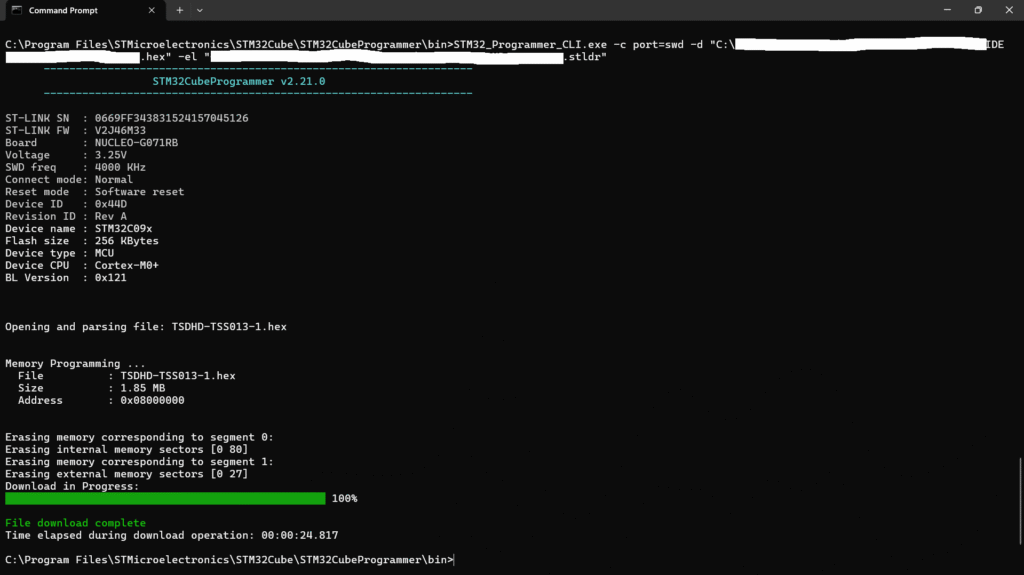
You might face a wrong parameter message, depending on the copy and paste method used on the terminal. If the message below is observed, try typing the command on the terminal instead of pasting it.

5. Advantages of Using the Command-Line Interface (CLI)
While the STM32CubeProgrammer Graphical User Interface (GUI) is intuitive for one-off operations, leveraging the Command-Line Interface (CLI) offers significant benefits, particularly in professional development and production environments.
Automation and Batch Processing: The primary advantage is the ability to automate repetitive tasks. CLI commands can be easily integrated into build scripts (e.g., Makefiles, Python scripts, shell scripts) or continuous integration/continuous deployment (CI/CD) pipelines. This allows for one-click compilation, programming, and testing sequences.
Speed and Efficiency: Without the overhead of rendering a graphical interface, the CLI typically offers faster execution times, which is critical when flashing many devices on a production line or repeatedly during development cycles.
Remote Operation: The CLI enables remote programming through secure shell (SSH) or other remote execution tools. This is ideal for programming devices located on remote test beds or in server farms where a local monitor/keyboard is unavailable.
Version Control and Reproducibility: Using a CLI command ensures that the exact programming sequence, file paths, and options are explicitly recorded in a script. This guarantees reproducible results across different operators and machines, which is vital for quality control and auditing.
Reference
For the most detailed and comprehensive description of the software, its features, supported devices, and all available CLI commands, always refer to the official documentation.
The primary user manual for the STM32CubeProgrammer software is:
STM32CubeProgrammer software description – User manual (UM2237).
This document provides a full description of the software, including installation procedures, detailed connection settings for various debug probes (ST-LINK, J-Link), a complete list of CLI commands, and specific instructions for configuring and using External Loaders.