STM32 HAL Tutorial: Low-Power UART Communication
Abstract
Learn how to use STM32 LPUART (Low-Power UART) in STOP mode with HAL and CubeMX. Step-by-step guide for ultra-low-power serial communication.
1. Introduction
UART is a common interface for MCU communication, but traditional UART modules cannot operate in low-power STOP modes.
LPUART (Low-Power UART) solves this problem:
- Can receive/transmit data while MCU is in STOP mode
- Maintains ultra-low power consumption (~1–10 μA in STOP mode)
- Ideal for battery-powered IoT devices
By the end of this episode, you’ll be able to:
- Configure LPUART for low-power operation
- Receive data while MCU is in STOP mode
- Wake up MCU on data reception
2. Prerequisites
- STM32 board with LPUART support (e.g., STM32L4, STM32G0)
- STM32CubeIDE installed
- Knowledge of HAL, low-power modes, and interrupts
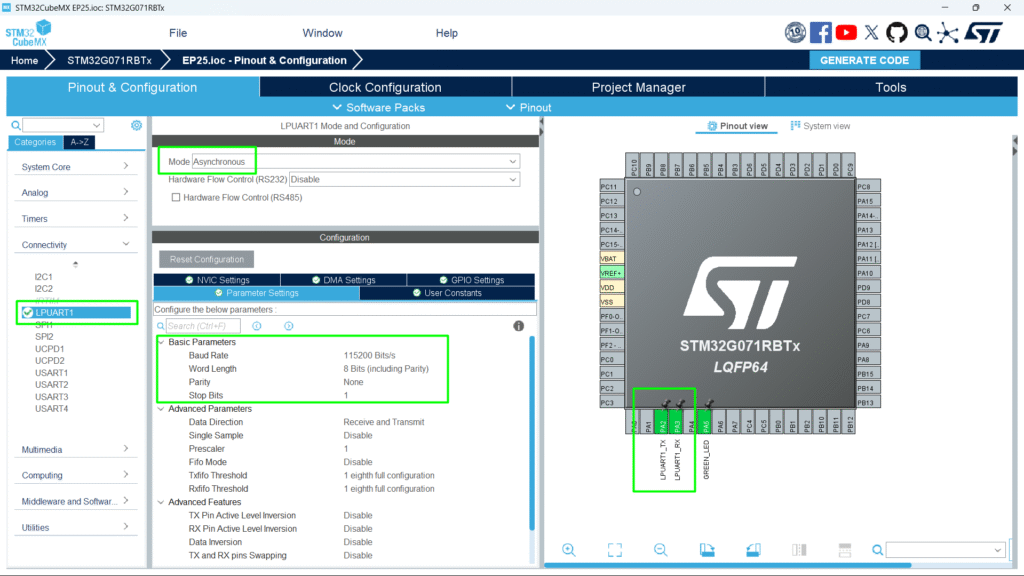
3. CubeMX Configuration
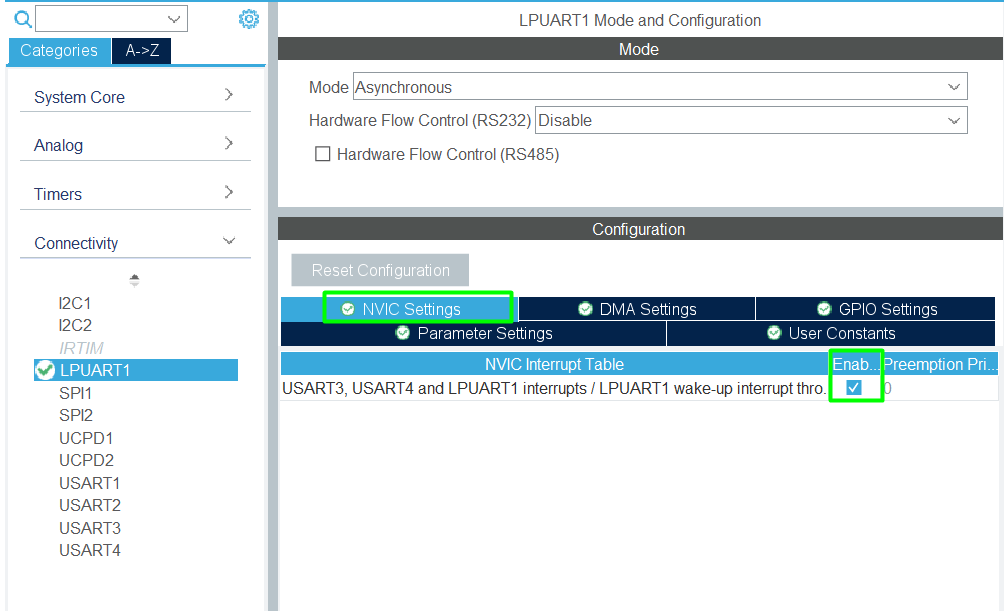
- Enable LPUART peripheral
- Set Mode: Asynchronous
- Enable the NVIC
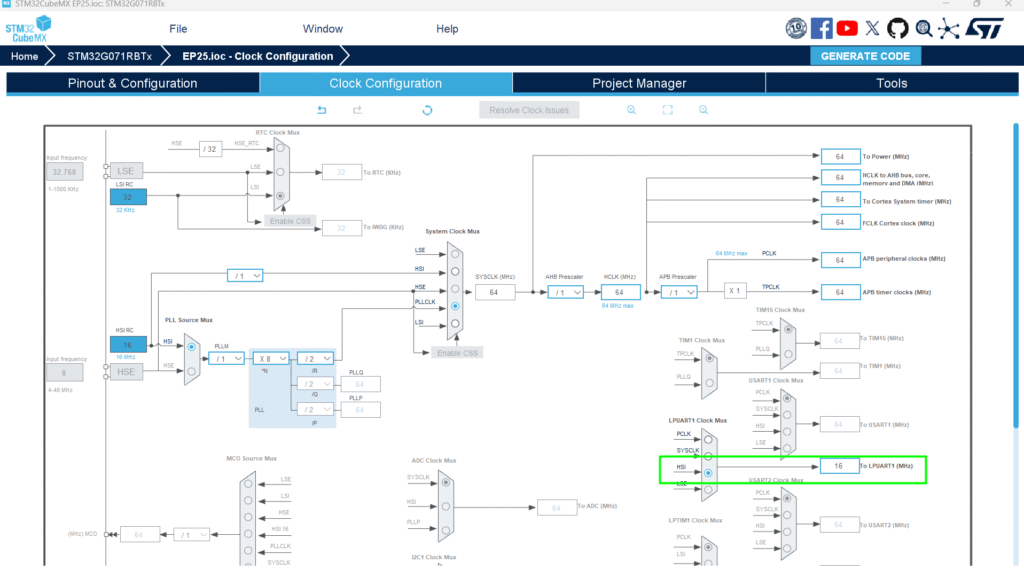
- Limit the baud rate is based on the clock source, use the HSI
- Generate initialization code
4. HAL Example: LPUART Initialization
					 hlpuart1.Instance = LPUART1;
 hlpuart1.Init.BaudRate = 115200;
 hlpuart1.Init.WordLength = UART_WORDLENGTH_8B;
 hlpuart1.Init.StopBits = UART_STOPBITS_1;
 hlpuart1.Init.Parity = UART_PARITY_NONE;
 hlpuart1.Init.Mode = UART_MODE_TX_RX;
 hlpuart1.Init.HwFlowCtl = UART_HWCONTROL_NONE;
 hlpuart1.Init.OneBitSampling = UART_ONE_BIT_SAMPLE_DISABLE;
 hlpuart1.Init.ClockPrescaler = UART_PRESCALER_DIV1;
 hlpuart1.AdvancedInit.AdvFeatureInit = UART_ADVFEATURE_NO_INIT;
 hlpuart1.FifoMode = UART_FIFOMODE_DISABLE;
 if (HAL_UART_Init(&hlpuart1) != HAL_OK)
 {
   Error_Handler();
 }
5. Entering STOP Mode with LPUART Wakeup
					 /* USER CODE BEGIN 2 */
 HAL_UARTEx_EnableStopMode(&hlpuart1);
 HAL_UART_Receive_IT(&hlpuart1, u8RxBuff, 1);
 /* USER CODE END 2 */

 /* USER CODE BEGIN WHILE */
 while (1)
 {
   /* USER CODE END WHILE */
   /* USER CODE BEGIN 3 */
	  HAL_SuspendTick();
	  HAL_PWR_EnterSTOPMode(PWR_LOWPOWERMODE_STOP1, PWR_STOPENTRY_WFI);
	  HAL_ResumeTick();
	  SystemClock_Config();
	  HAL_Delay(1000);
	  HAL_UART_Transmit(&hlpuart1, (uint8_t *) "\r\nHello\r\n", sizeof("\r\nHello\r\n"), 1000);
	  HAL_Delay(1000);
 }
 /* USER CODE END 3 */
- The MCU enters STOP mode, but LPUART RX can wake it up
- Fast wakeup ensures minimal latency for incoming data
6. Handling LPUART Reception in STOP Mode
Use HAL callbacks to handle data reception:
					/* USER CODE BEGIN PV */
uint8_t u8RxBuff[10];
/* USER CODE END PV */
					/* USER CODE BEGIN 4 */
void HAL_UART_RxCpltCallback(UART_HandleTypeDef *huart)
{
	HAL_UART_Receive_IT(&hlpuart1, u8RxBuff, 1);
}
/* USER CODE END 4 */
- The MCU wakes on first received byte
- Allows event-driven low-power operation
7. Hands-On Lab Example
- Connect MCU TX/RX to PC or another MCU
- Configure LPUART RX wakeup
- Enter STOP mode
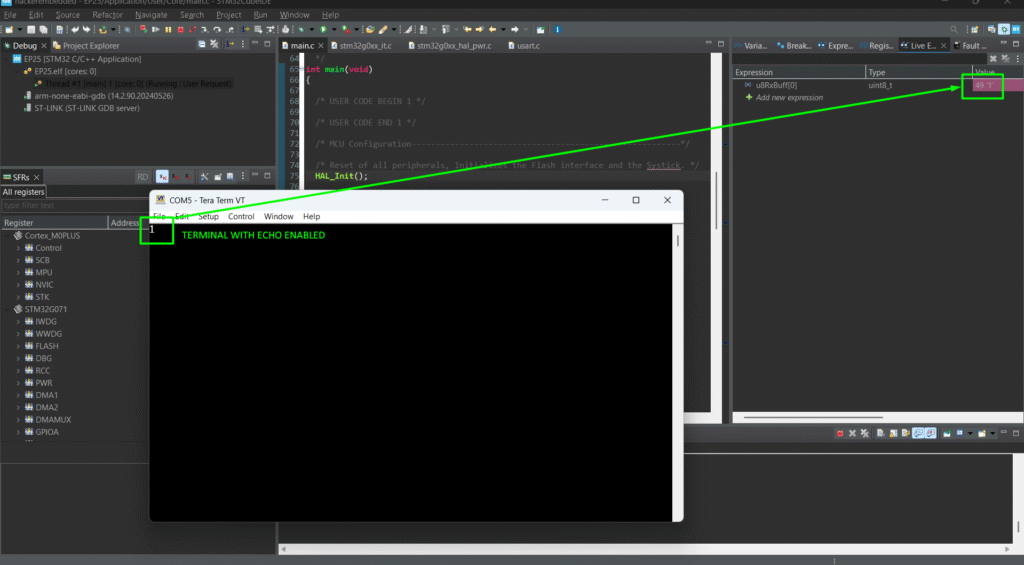
- Send a byte from PC → MCU wakes up
- Process received byte and toggle LED or send a message
- Re-enter STOP mode for the next byte
Tip: Combine LPUART STOP mode + RTC wakeups for ultra-low-power periodic and event-driven systems
8. Advantages of LPUART in STOP Mode
- Enables event-driven low-power communication
- Maintains ultra-low current (~1–10 μA) in STOP mode
- Works with RTC, backup registers, and low-power timers
- Essential for IoT nodes, remote sensors, and wearable devices