STM32 Overview: STM32CubeMX vs STM32CubeMX2 (Ecosystem Comparison)
Abstract
If you have been developing with STM32 microcontrollers for a while,
you probably know STM32CubeMX very well.
For years, STM32CubeMX has been one of the central tools in the STM32
development workflow. It allows developers to configure clocks, pins,
peripherals and middleware and then generate the initialization code
required to start a project.
But with the introduction of the STM32C5 family,
STMicroelectronics has introduced something new:
STM32CubeMX2.
Despite the name, STM32CubeMX2 is not simply a newer version of the
traditional STM32CubeMX. It is a new flavor of the STM32 configuration
and code-generation tool, designed to work with the new STM32Cube
ecosystem based on HAL2.
So what exactly changed? And, perhaps more importantly:
Do STM32 developers need to learn everything again?
The short answer is no. But there are some important differences that
developers should understand.
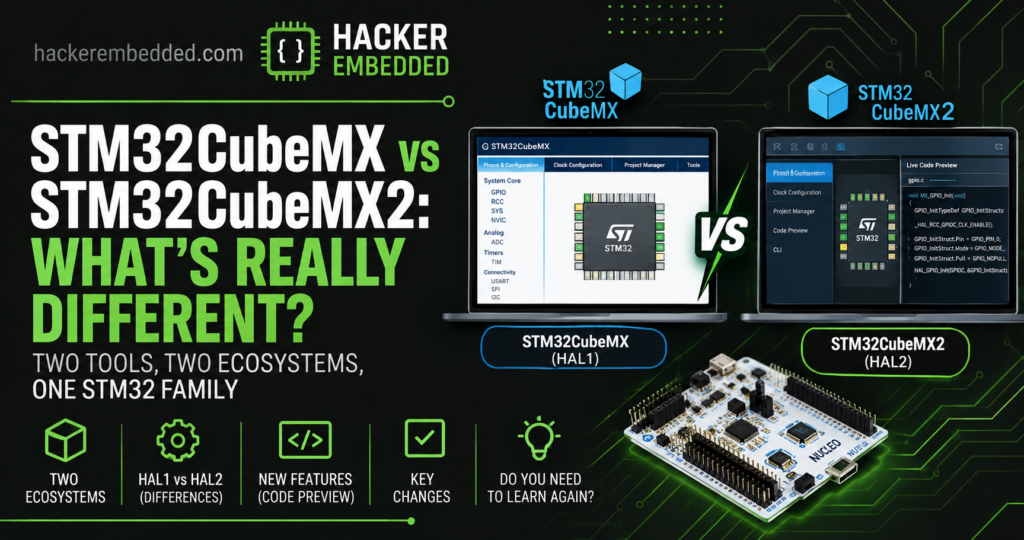
1. STM32CubeMX and STM32CubeMX2 Are Two Ecosystems
The first important point is that STM32CubeMX and STM32CubeMX2
coexist.
The traditional STM32CubeMX continues to support STM32 devices based
on the original HAL software layer. STM32CubeMX2 is intended for STM32
microcontrollers using the new HAL2 software layer. The STM32C5 is the
first STM32 family introduced with this new ecosystem.
ST currently describes the relationship as two STM32CubeMX offerings
supporting different STM32 families. A simplified view looks like this:
| STM32 ecosystem |
Configuration tool |
HAL |
| Traditional STM32 |
STM32CubeMX |
HAL1 |
| New STM32 generation |
STM32CubeMX2 |
HAL2 |
This distinction is extremely important. You should not assume that
installing STM32CubeMX2 means that all your existing STM32 projects
can simply be opened and migrated.
2. What is STM32CubeMX?
STM32CubeMX is STMicroelectronics' graphical configuration and
code-generation tool for STM32 microcontrollers.
It provides a graphical interface for configuring:
- GPIO
- clocks
- timers
- UART
- SPI
- I²C
- ADC
- DMA
- interrupts
- middleware
- RTOS components
- project settings
After the configuration is complete, CubeMX generates the initialization
code required by the application. The traditional workflow is familiar
to most STM32 developers:
STM32 MCU
    ↓
STM32CubeMX
    ↓
Configure pins
Configure clocks
Configure peripherals
Configure middleware
    ↓
Generate project
    ↓
IDE / compiler
    ↓
Build
    ↓
Debug
This workflow remains relevant for existing STM32 families.
3. What Is STM32CubeMX2?
STM32CubeMX2 is the next generation of the STM32 configuration
experience. It was introduced together with the new STM32Cube software
architecture used by STM32C5.
The new tool keeps many of the concepts developers already know from
CubeMX, but introduces a redesigned workflow and additional
capabilities. Among the most interesting changes are:
- a refreshed user interface;
- a new configuration workflow;
- live code preview;
- improved command-line capabilities;
- integration with the HAL2-based STM32Cube software ecosystem.
ST specifically highlights the new code preview capability, which
allows developers to see the effect of configuration changes before
generating the complete project.
4. The Most Interesting New Feature: Code Preview
One of the most useful changes in STM32CubeMX2 is the
live code preview.
In the traditional workflow, developers typically modify a
configuration and then regenerate the project. For example:
Configure GPIO
       ↓
Generate Code
       ↓
Open generated files
       ↓
Inspect result
CubeMX2 introduces a more interactive approach. The configuration can
provide visibility into the generated code before the complete project
is regenerated.
This is particularly useful when you are trying to understand what a
particular configuration option actually does. For experienced
developers, this can also reduce the need to repeatedly regenerate an
entire project just to inspect a small configuration change.
ST describes this as one of the key improvements of STM32CubeMX2.
5. STM32CubeMX2 and HAL2
The biggest conceptual difference between the two tools is not actually
the graphical interface. It is the software architecture
underneath it.
STM32CubeMX2 is designed around HAL2. The original
STM32Cube HAL has been used across STM32 families for many years.
HAL2 introduces changes intended to improve:
- code size;
- resource management;
- performance;
- portability;
- interaction with low-level APIs.
The STM32CubeC5 package officially identifies HAL2 as version 2.0.0
and states that it is compatible with STM32CubeMX2.
This means that STM32CubeMX2 should not be thought of simply as:
"CubeMX with a new user interface."
It is part of a broader evolution of the STM32 software ecosystem.
6. Does STM32CubeMX2 support my STM32F4?
This is one of the first questions existing STM32 developers are likely
to ask.
For now, the important distinction is the STM32 software generation
rather than simply the MCU family name, existing STM32 families that
use the traditional HAL/MX ecosystem remain supported by STM32CubeMX
only. New families starting with STM32C5 use STM32CubeMX2 and HAL2.
ST has explicitly stated that existing STM32 series remain supported
by the current STM32Cube components.
Therefore, if you have an existing STM32F4 project, you should not
assume that you need to (nor that you even can) migrate it to CubeMX2.
Your existing development environment remains valid, so we can continue
to use STM32CubeIDE, even with STM32C5.
7. STM32CubeMX vs STM32CubeMX2
Here is the practical comparison.
| Feature |
STM32CubeMX |
STM32CubeMX2 |
| STM32 HAL |
HAL1 |
HAL2 |
| STM32C5 |
No |
Yes |
| Existing STM32 families |
Yes |
Family-dependent |
| Graphical configuration |
Yes |
Yes |
| Code generation |
Yes |
Yes |
| Live code preview |
Traditional workflow |
Yes |
| Command-line capabilities |
Available |
Enhanced |
| New STM32 generations |
No |
Yes |
| Existing projects |
Continue to work |
Not a universal replacement |
The important message is:
STM32CubeMX2 is not a replacement for STM32CubeMX.
At least for now and given the usual 10 years commitment, they’ll
coexist for quite a while.
8. What about STM32CubeIDE?
The development environment is evolving alongside CubeMX2 and HAL2.
ST has also updated its STM32CubeIDE ecosystem, including STM32CubeIDE
for VS Code, to take advantage of the new workflow.
This is part of a larger movement toward more flexible development
workflows. For developers who prefer VS Code, this is particularly
interesting. A modern STM32 workflow can increasingly look like:
STM32CubeMX2
       ↓
Project configuration
       ↓
CMake
       ↓
VS Code
       ↓
Build + Debug
rather than relying exclusively on the traditional Eclipse-based IDE
workflow.
But of course, nothing prohibits us to use STM32CubeIDE and CMAKE with
STM32C5 and the same should be true for future releases.
9. Should you learn STM32CubeMX2?
If you work exclusively with older STM32 families, there is no
immediate reason to abandon your existing CubeMX workflow.
However, if you are starting a new project based on STM32C5 or another
STM32 family that uses HAL2, you should learn STM32CubeMX2.
There is another reason to learn it early: the new ecosystem is designed
as the foundation for future STM32 generations.
ST describes STM32C5 as the first family using this updated STM32Cube
foundation, with new STM32 series starting from STM32C5 moving to the
new ecosystem.
10. What STM32 developers should learn
If you are moving into the new ecosystem, I recommend learning the
following concepts:
10.1 STM32CubeMX2
Learn the new configuration workflow. We’ll have an article for this soon.
10.2 HAL2
Understand how the new HAL differs from the traditional HAL. This
should be straight forward.
10.3 CMake
Understand how the project is structured and built.
10.4 VS Code
Learn how to configure, build and debug STM32 projects outside the
traditional IDE workflow. This is the least mandatory, as we can simply
use the good old STM32CubeIDE and import the created MX2 project using
CMAKE. If you don’t know how to do it, there is an ST articles for
that:
How to import a STM32CubeMX2 CMake project into STM32CubeIDE
,
and app note:
AN5952 – How to use CMake in STM32CubeIDE
.
10.5 STM32C5
Use a real STM32C5 board to understand the new ecosystem.
11. The Bigger Picture
STM32CubeMX2 is more important than the name suggests.
It represents one component of a broader change in the STM32
development ecosystem:
                STM32C5
                    │
          ┌─────────┼─────────┐
          │         │         │
        HAL2     CubeMX2    CMake
          │         │         │
          └─────────┼─────────┘
                    │
                 VS Code
                    │
             Modern Workflow
For developers who have spent years using STM32CubeMX, the transition
should not be intimidating.
The concepts remain familiar. But the tools are evolving.
12. Conclusion
STM32CubeMX2 is not simply "STM32CubeMX version 2."
It is part of a new STM32 software ecosystem built around HAL2 and
initially introduced with the STM32C5 family.
The traditional STM32CubeMX ecosystem remains relevant for existing
STM32 families, while STM32CubeMX2 provides the new workflow for
HAL2-based devices.
For STM32 developers, the most important thing to understand is
therefore not:
"Should I replace CubeMX?"
but rather:
"Which STM32 software ecosystem does my MCU use?"
Once you understand that distinction, the transition to STM32CubeMX2
becomes much easier.
In the next article, we will go beyond the comparison and build an
actual STM32C5 project using STM32CubeMX2 and VS Code.